설명 / Description
여백(white space) — 네거티브 스페이스라고도 불립니다 — 은 시각적 요소 사이와 주위의 빈 영역입니다. 이것은 낭비되는 공간이 아닙니다. 시각화의 표시, 텍스트, 색상만큼이나 의도적이고 중요한 구조적 요소입니다. 여백은 그룹을 분리하고, 위계를 만들며, 시선을 유도하고, 시청자의 지각 시스템에 정보를 처리할 여유를 줍니다. 위대한 타이포그래퍼 얀 치홀트(Jan Tschichold)의 말처럼: "여백은 수동적 배경이 아닌 능동적 요소로 간주되어야 한다."
데이터 시각화에서 여백은 여러 스케일에서 작동합니다. 매크로 여백은 시각화 전체 주위의 마진, 제목과 차트 영역 사이의 간격, 나란한 패널 사이의 공간입니다. 시각화의 경계와 주변 콘텐츠와의 관계를 정의합니다. 마이크로 여백은 막대 차트에서 막대 사이의 간격, 툴팁 내부의 패딩, 주석 텍스트 줄 사이의 행간입니다. 이러한 작은 공간이 요소 수준에서 가독성과 그룹화를 제어합니다. 두 스케일 모두 의도적으로 관리해야 합니다. 부주의하거나 비일관적인 여백은 답답하거나 혼란스럽거나 둘 다인 레이아웃을 만듭니다.
시각화 디자인에서 가장 흔한 오류는 여백이 너무 많은 것이 아니라 너무 적은 것입니다. 차트가 데이터, 레이블, 범례, 주석으로 가장자리까지 꽉 차면 시청자를 압도하는 빽빽한 정보의 벽이 됩니다. 인지심리학 연구는 간격이 이해를 돕는다는 것을 일관되게 보여줍니다: 독자는 넓은 행간에서 텍스트를 더 빠르게 처리하고, 시청자는 요소에 여유 공간이 있을 때 차트를 더 빠르게 해독합니다. 모든 픽셀을 정보로 채우려는 본능은 이해할 수 있지만, 여백 투자의 수익은 상당합니다.
White space — also called negative space — is the empty area between and around visual elements. It is not wasted space. It is a structural element as deliberate and important as the marks, text, and color in a visualization. White space separates groups, creates hierarchy, directs the eye, and gives the viewer's perceptual system room to process information. In the words of Jan Tschichold, the great typographer: "White space is to be regarded as an active element, not a passive background."
In data visualization, white space operates at multiple scales. Macro white space is the margin around the entire visualization, the gap between a title and the chart area, and the space between side-by-side panels. It defines the visualization's boundary and its relationship to surrounding content. Micro white space is the gap between bars in a bar chart, the padding inside a tooltip, the leading between lines of annotation text. These small spaces control legibility and grouping at the element level. Both scales must be managed intentionally; careless or inconsistent white space produces layouts that feel cramped, chaotic, or both.
The most common error in visualization design is not too much white space but too little. When charts are packed edge to edge with data, labels, legends, and annotations, the result is a dense wall of information that overwhelms the viewer. Research in cognitive psychology consistently shows that spacing aids comprehension: readers process text faster with generous line spacing, and viewers decode charts faster when elements have breathing room. The instinct to fill every pixel with information is understandable — screen real estate feels scarce — but the return on white space investment is substantial.
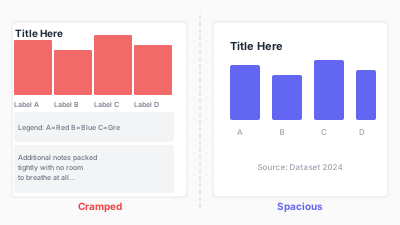
충분한 여백(왼쪽)과 여백 부족(오른쪽) 레이아웃 비교 / Generous white space (left) vs. cramped layout (right)
핵심 아이디어 / Key Ideas
- 여백은 낭비가 아닙니다: 구조, 위계, 집중을 만드는 디자인 요소입니다. 여백을 제거하면 이해도가 떨어집니다.
- White space is not wasted space: it is a design element that creates structure, hierarchy, and focus. Removing it degrades comprehension.
- 마진 일관성: 차트 영역 주위, 제목과 차트 사이, 차트와 출처 표기 사이에 균일한 마진을 사용합니다. 비일관적 마진은 부주의를 신호합니다.
- Margin consistency: use uniform margins around the chart area, between title and chart, and between chart and source line. Inconsistent margins signal carelessness.
- 막대 차트 간격: 막대 사이 간격은 대략 막대 너비의 50~100%여야 합니다. 간격이 전혀 없으면 히스토그램 느낌이 나고, 너무 넓으면 막대가 단절되어 보입니다.
- Bar chart spacing: the gap between bars should be roughly 50–100% of bar width. No gap at all creates a histogram look; too much gap makes bars feel disconnected.
- 스몰 멀티플의 패널 간격: 패널 사이의 거터는 패널을 구분할 만큼 크되 패널 간 비교를 유지할 만큼 작아야 합니다.
- Panel spacing in small multiples: gutters between panels should be large enough to separate panels but small enough to maintain the reading-across-panels comparison.
- 레이블과 툴팁의 패딩: 경계 상자에 텍스트가 닿으면 읽기 어렵습니다. 내부 패딩을 추가하여 텍스트가 숨 쉴 수 있게 합니다.
- Padding in labels and tooltips: text that touches its bounding box is hard to read. Add internal padding so text breathes.
- 비움의 여유: 넉넉한 마진, 명확하게 레이블된 몇 개의 데이터 포인트, 충분한 여백을 가진 차트는 자신감과 권위를 전달합니다. 밀도는 불안을 신호합니다.
- The luxury of emptiness: a chart with generous margins, a few clearly labeled data points, and ample white space communicates confidence and authority. Density signals anxiety.
좋은 예시 / Good Examples
- 이코노미스트 차트 스타일: 넉넉한 마진, 제목과 차트 영역 사이의 충분한 공간, 데이터 영역 내부의 개방감을 유지하는 옅은 격자선.
- The Economist chart style: generous margins, ample space between the title and chart area, and light grid lines that maintain the sense of openness within the data area itself.
- 주변 패딩이 있는 텍스트에 삽입된 스파크라인: 작은 차트가 행간 안에 편안하게 놓이며 답답하지도 떠있지도 않습니다.
- Sparklines embedded in text with surrounding padding: the small chart sits comfortably within the line spacing, neither cramped nor floating.
- 차트 그룹 사이에 전체 열을 여백으로 할애하는 대시보드 레이아웃 — 구분선보다 더 효과적으로 섹션을 시각적으로 분리합니다.
- Dashboard layouts that dedicate a full column to white space between chart groups, visually separating sections more effectively than a divider line would.
- 데이터 영역의 자연스러운 여백에 주석이 배치되는 주석 달린 차트(예: 인접 값이 낮아 공간이 생기는 꺾은선 그래프의 피크에 레이블 배치).
- Annotated charts where annotations are placed in the natural white space of the data area (e.g., labeling a peak in a line chart where adjacent values are lower, creating room for the label).
안티 패턴 / Anti-Patterns
- 차트 사이에 마진이 전혀 없는 벽-대-벽 대시보드. 각 차트의 축 레이블이 인접 차트의 제목과 충돌하며 하나의 시각화가 어디서 끝나고 다음이 어디서 시작되는지 알 수 없습니다.
- Wall-to-wall dashboards with zero margin between charts. Each chart's axis labels collide with the neighboring chart's title, and the viewer cannot tell where one visualization ends and the next begins.
- 컨테이너를 픽셀 단위로 꽉 채운 차트: 극단값의 데이터 포인트가 차트 테두리에 닿고 마지막 축 레이블이 잘립니다. 항상 데이터 범위 너머에 패딩을 남겨야 합니다.
- Charts that fill their container to the pixel: data points at the extreme values touch the chart border, and the last axis label is clipped. Always leave padding beyond the data range.
- 겹치는 레이블: 데이터 포인트 사이에 충분한 공간이 없어 레이블이 충돌합니다. 폰트를 줄이는(읽을 수 없게 만드는) 대신 회전, 약어, 레이블 필터링으로 여백을 확보합니다.
- Overlapping labels: when there is not enough space between data points, labels collide. Instead of shrinking the font (making labels illegible), add more white space by rotating, abbreviating, or filtering labels.
- 답답한 범례: 범례 항목이 간격 없이 빽빽하게 배치됩니다. 시청자가 각 항목을 주의 깊게 파싱하지 않으면 범례를 훑어볼 수 없습니다.
- Cramped legends: legend items packed tightly together without spacing between entries. The viewer cannot scan the legend without carefully parsing each item.
- 빈 영역을 장식으로 채우기: 차트에 자연스러운 여백이 있을 때(예: 데이터가 한 사분면에 집중된 산점도) 빈 사분면을 클립아트, 워터마크, 배경 이미지로 채우려는 충동을 참으면 명확성이 유지됩니다.
- Filling empty areas with decorations: when a chart has natural white space (e.g., a scatterplot with data concentrated in one quadrant), resisting the urge to fill the empty quadrant with clip art, watermarks, or background images preserves clarity.
더 읽어보기 / Further Reading
- Tufte, E. R. (1990). Envisioning Information. Graphics Press.
- Muller-Brockmann, J. (1981). Grid Systems in Graphic Design. Verlag Niggli.
- Schwabish, J. (2021). Better Data Visualizations. Columbia University Press.
- Samara, T. (2017). Making and Breaking the Grid (2nd ed.). Rockport Publishers.