설명 / Description
모든 것이 중요할 수는 없습니다. 시각화의 모든 요소가 주의를 끌려 할 때 — 굵은 제목, 채도 높은 색상, 두꺼운 테두리, 큰 레이블 — 결과는 강조가 아니라 불협화음입니다. 관객의 시선은 안착할 곳이 없어 요소에서 요소로 튀어다니며 이해력을 쌓지 못합니다. 시각적 위계란 의도적인 강조의 오케스트레이션입니다: 관객이 무엇을 첫 번째, 두 번째, 세 번째로 보는지 결정하고, 크기, 굵기, 색상, 대비를 사용하여 그 순서를 강제하는 것입니다.
Adam Wathan과 Steve Schoger는 Refactoring UI에서 이를 핵심 디자인 원칙으로 설명합니다: 폰트 크기만으로 위계를 만들려 하지 말고, 폰트 굵기, 색상, 간격의 조합을 사용하세요. 크고 연한 회색 부제와 작지만 어둡고 굵은 헤드라인을 쌍으로 사용하면, 예상된 크기 관계를 뒤집으면서도 대비와 굵기가 위계적 역할을 올바로 수행합니다. 데이터 시각화에 적용하면, 데이터 마크(바, 선, 점) 자체가 캔버스에서 가장 두드러진 요소여야 합니다. 제목은 질문을 프레이밍하여 데이터를 보조합니다. 축 레이블, 격자선, 범례는 배경으로 물러나야 하며, 필요할 때 존재하되 경쟁하지 않아야 합니다.
Refactoring UI의 중요한 미묘함 하나: 색상 배경 위에서 텍스트를 약화시키기 위해 회색을 사용하지 마세요 — 대신 불투명도를 줄이세요. 파란 배경 위의 회색 텍스트는 칙칙하고 분리되어 보이지만, 같은 파란색 위의 60% 불투명도 흰색 텍스트는 가독성을 유지하면서 자연스럽게 어우러집니다. 시각화에서 이 원칙은 흰색이 아닌 표면 위의 모든 종속 요소에 적용됩니다: 다크 테마 대시보드의 격자선, 음영 영역 위의 주석 텍스트, 색상 패널 안의 범례 레이블. 불투명도를 줄이면 색상 조화를 유지하면서 위계를 설정하지만, 고정된 회색으로 대체하면 조화가 깨집니다.
Not everything can be important. When every element in a visualization screams for attention — bold titles, saturated colors, thick borders, large labels — the result is not emphasis but cacophony. The viewer's eye has nowhere to land, so it bounces from element to element without building comprehension. Visual hierarchy is the deliberate orchestration of emphasis: deciding what the viewer sees first, second, and third, and using size, weight, color, and contrast to enforce that order.
Adam Wathan and Steve Schoger, in Refactoring UI, articulate this as a core design principle: instead of reaching for font size alone to create hierarchy, use a combination of font weight, color, and spacing. A large, light-gray subtitle paired with a smaller, dark, bold headline can invert the expected size relationship and still read correctly because the contrast and weight do the hierarchical work. Applied to data visualization, this means the data marks themselves — the bars, lines, and points — should be the loudest elements on the canvas. Titles support the data by framing the question. Axis labels, gridlines, and legends should recede into the background, present when needed but never competing. The annotation layer sits between data and infrastructure, guiding the eye without overpowering the marks.
A critical subtlety from Refactoring UI: don't use grey text on colored backgrounds to de-emphasize — reduce opacity instead. Grey text on a blue background looks dull and disconnected; white text at 60% opacity on the same blue blends naturally while remaining legible. In visualization, this principle applies to any element that must be subordinate on a non-white surface: gridlines on a dark-themed dashboard, annotation text over a shaded area, or legend labels inside a colored panel. Reducing opacity maintains color harmony while establishing hierarchy; substituting a fixed grey breaks it.
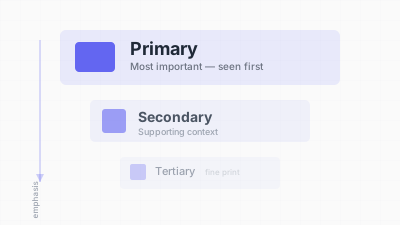
크기, 굵기, 대비를 통해 시선의 흐름을 설계한다 / Designing the flow of attention through size, weight, and contrast
핵심 아이디어 / Key Ideas
- 세 단계의 강조: 모든 시각화에는 1차(데이터 마크, 핵심 인사이트 주석), 2차(제목, 축 레이블, 직접 레이블), 3차(격자선, 눈금, 출처, 범례) 레이어가 있어야 합니다. 각 레이어는 시각적으로 구분되어야 합니다.
- Three levels of emphasis: every visualization should have a primary (data marks, key insight annotation), secondary (title, axis labels, direct labels), and tertiary layer (gridlines, tick marks, source line, legends). Each layer should be visually distinct from the others.
- 크기만이 유일한 수단이 아니다: 폰트 굵기, 색상 채도, 명도는 위계를 설정하는 데 동등하게 강력한 도구입니다. 14px 볼드 어두운 레이블이 20px 연한 회색 레이블보다 우위에 설 수 있습니다.
- Size is not the only lever: font weight, color saturation, and lightness are equally powerful tools for establishing hierarchy. A 14px bold dark label can outrank a 20px light-gray label.
- 숨기지 말고 약화시켜라: 존재해야 하는 요소(격자선, 축 레이블)는 더 밝은 색이나 낮은 불투명도로 렌더링하세요 — 데이터를 스캔할 때는 보이지 않지만, 찾으면 보이도록.
- De-emphasize by softening, not hiding: elements that must be present (gridlines, axis labels) should be rendered in a lighter color or lower opacity — visible when the viewer looks for them, invisible when scanning the data.
- 색상 표면 위에서는 회색 대신 불투명도 조절: 흰색이 아닌 배경에서는 텍스트를 약화시키기 위해 고정 회색 대신 불투명도를 줄입니다(예:
rgba(255,255,255,0.6)). 시각적 조화를 유지하면서 위계를 설정합니다. - Opacity over grey on colored surfaces: on any non-white background, use reduced opacity (e.g.,
rgba(255,255,255,0.6)) rather than a flat grey to de-emphasize text while preserving visual harmony. - 차트당 하나의 초점: 관객의 시선을 하나의 출발점으로 이끄세요 — 가장 높은 바, 주석이 달린 정점, 강조된 선. 그 앵커에서 위계가 펼쳐집니다.
- One focal point per chart: guide the viewer's eye to a single starting point — the tallest bar, the annotated peak, the highlighted line. From that anchor, the hierarchy unfolds.
- 흐리게 보기(squint) 테스트: 눈을 흐리게 하고 차트를 보세요. 여전히 보이는 요소가 가장 높은 시각적 무게를 가진 것입니다. 그것이 격자선이나 범례 박스라면 데이터 대신이라면, 위계가 깨진 것입니다.
- Squint test: blur your eyes and look at the chart. The element that remains visible is the one with the highest visual weight. If it is a gridline or a legend box instead of the data, the hierarchy is broken.
좋은 예시 / Good Examples
- The Pudding의 비주얼 에세이: 데이터 마크는 굵고 채도가 높으며, 주석은 작고 밝은 타입을 사용하고, 격자선은 거의 보이지 않는 헤어라인입니다. 위계가 데이터에서 맥락으로, 인프라로 주의를 깔때기처럼 유도합니다.
- The Pudding's visual essays: data marks are bold and saturated; annotations use smaller, lighter type; gridlines are barely visible hairlines. The hierarchy funnels attention from data to context to infrastructure.
- Bloomberg 터미널 차트: 현재 가격이나 핵심 지표가 크고 굵게 렌더링되며, 보조 정보(거래량, 시간 범위, 축 레이블)는 작고 음소거된 타입을 사용합니다. 정보 밀도가 높은 화면에서도 한눈에 위계가 읽힙니다.
- Bloomberg terminal charts: the current price or key metric is rendered large and bold, while supporting information (volume, time range, axis labels) uses smaller, muted type. The hierarchy is legible at a glance, even on information-dense screens.
- Storytelling with Data의 "사전주의 속성" 기법: Cole Nussbaumer Knaflic가 논의 중인 시리즈를 제외한 모든 데이터 시리즈를 회색으로 처리하여, 대비만으로 명확한 초점을 만듭니다.
- Storytelling with Data's "preattentive attributes" technique: Cole Nussbaumer Knaflic grays out all data series except the one under discussion, making it the unambiguous focal point through contrast alone.
- 다크 테마 대시보드(예: Grafana, Datadog): 별도의 회색 값 대신 다양한 불투명도의 흰색 텍스트를 사용합니다. 주요 지표 레이블은 100% 불투명도, 보조는 70%, 3차는 40%. 응집력 있는 부드러운 위계를 만듭니다.
- Dark-themed dashboards (e.g., Grafana, Datadog) that use white text at varying opacities rather than distinct grey values. The primary metric label is at 100% opacity, secondary labels at 70%, tertiary at 40%. This creates a smooth hierarchy that feels cohesive.
안티 패턴 / Anti-Patterns
- 모든 것이 볼드: 제목, 부제, 축 레이블, 데이터 레이블, 범례 텍스트가 모두 볼드이면, 볼드가 강조 기능을 상실합니다. 기본값이 되어 아무것도 돋보이지 않습니다.
- Everything is bold: when titles, subtitles, axis labels, data labels, and legend text are all bold, boldness ceases to function as emphasis. It becomes the baseline, and nothing stands out.
- 균일한 색상 강도: 모든 차트 요소 — 격자선, 데이터 마크, 레이블, 테두리 — 가 같은 채도의 색으로 렌더링됩니다. 관객이 전경과 배경을 구분할 수 없습니다.
- Uniform color intensity: all chart elements — gridlines, data marks, labels, borders — rendered in the same saturated color. The viewer cannot distinguish foreground from background.
- 과대한 범례: 범례 박스가 설명하는 데이터보다 더 크거나, 더 화려하거나, 더 두드러집니다. 범례가 차트 대신 초점이 됩니다.
- Oversized legends: a legend box that is larger, more colorful, or more prominent than the data it describes. The legend becomes the focal point instead of the chart.
- 색상 배경 위의 회색 텍스트: 파란색 패널 위의 레이블을
#999로 설정하여 약화시킵니다. 회색이 배경색과 어울리지 않고 싸웁니다. 대신rgba(255,255,255,0.5)를 사용하세요. - Grey text on colored backgrounds: de-emphasizing a label by setting it to
#999on a blue panel. The grey fights the background color instead of blending with it. Usergba(255,255,255,0.5)instead. - 초점이 된 차트 장식: 장식 요소(3D 효과, 그라데이션 채우기, 그림자 박스)가 페이지에서 가장 높은 시각적 무게를 차지하여 실제 데이터에서 주의를 뺏습니다.
- Chartjunk as focal point: decorative elements (3D effects, gradient fills, shadow boxes) that have the highest visual weight on the page, drawing attention away from the actual data.
- 대시보드의 수평 위계: 대시보드의 모든 카드, 차트, 지표에 같은 크기, 테두리, 타이포그래피 처리가 적용됩니다. 위계 없이는 관객이 중요한 것을 찾기 위해 모든 요소를 읽어야 합니다.
- Flat hierarchy in dashboards: every card, chart, and metric on a dashboard given the same size, border, and typographic treatment. Without hierarchy, the viewer must read every element to find the one that matters.
더 읽어보기 / Further Reading
- Wathan, A., & Schoger, S. (2018). Refactoring UI. Self-published.
- Knaflic, C. N. (2015). Storytelling with Data. Wiley.
- Munzner, T. (2014). Visualization Analysis and Design. CRC Press.
- Few, S. (2006). Information Dashboard Design. Analytics Press.
- Ware, C. (2012). Information Visualization: Perception for Design (3rd ed.). Morgan Kaufmann.