설명 / Description
타이포그래피는 데이터 시각화의 보이지 않는 건축입니다. 시청자들이 막대, 선, 점에 집중하는 동안, 제목, 부제목, 축 레이블, 눈금 레이블, 주석, 출처 표기가 데이터에 의미의 프레임을 씌웁니다. 명확한 타이포그래피 위계가 없으면 차트는 시청자가 처음부터 해독해야 하는 형태의 집합이 됩니다. 위계가 있으면 시청자의 시선이 의도된 순서로 안내됩니다: 먼저 제목(이것은 무엇인가?), 다음 부제목이나 주석(무엇을 주목해야 하는가?), 그다음 데이터, 마지막으로 세부 사항(출처, 방법론, 주의 사항).
타이포그래피 위계의 도구는 크기, 굵기(볼드 vs. 보통), 스타일(이탤릭, 대문자), 색상, 공간적 위치입니다. 가장 중요한 텍스트인 제목이 가장 크고 굵어야 합니다. 보조 텍스트는 중요도에 비례하여 크기와 굵기가 줄어듭니다. 축 레이블은 중간 위계에 위치합니다: 차트 읽기에 필수적이지만 진입점은 아닙니다. 눈금 레이블과 출처 표기가 가장 작습니다. 이 강조의 기울기는 신문이 수세기 동안 정보를 구조화해온 방식 — 헤드라인, 소제목, 본문, 캡션 — 을 반영합니다.
데이터 시각화에서 타이포그래피는 이중의 역할을 수행해야 합니다. 가독성(렌더링된 크기에서 물리적으로 읽을 수 있어야 하며, 모바일 화면이나 프로젝터 슬라이드에서도 마찬가지)과 의미성(위계에서의 역할을 한눈에 전달)입니다. 시청자는 텍스트를 읽지 않고도 그것이 제목인지, 레이블인지, 주석인지, 각주인지 알 수 있어야 합니다. 이 시스템이 작동하면 차트는 자체 설명이 되고, 실패하면 시청자는 길을 잃습니다.
Typography is the invisible architecture of a data visualization. While viewers focus on bars, lines, and points, it is the title, subtitle, axis labels, tick labels, annotations, and source credits that frame the data in meaning. Without a clear typographic hierarchy, a chart is a collection of shapes that the viewer must decode from scratch. With one, the viewer's eye is guided through the visualization in a deliberate sequence: first the title (what is this about?), then the subtitle or annotation (what should I notice?), then the data, and finally the fine print (source, methodology, caveats).
The tools of typographic hierarchy are size, weight (bold vs. regular), style (italic, uppercase), color, and spatial position. The most important text — the title — should be the largest and boldest. Supporting text decreases in size and weight in proportion to its importance. Axis labels are mid-hierarchy: essential for reading the chart but not the entry point. Tick labels and source lines are the smallest. This gradient of emphasis mirrors the way newspapers have structured information for centuries: headline, subhead, body, caption.
In data visualization specifically, typography must serve a dual role. It must be legible (physically readable at its rendered size, even on a phone screen or a projected slide) and semantic (conveying its role in the hierarchy at a glance). A viewer should never have to read the text to understand what kind of text it is — its visual treatment should signal whether it is a title, a label, an annotation, or a footnote. When this system works, the chart becomes self-documenting; when it fails, the viewer is lost.
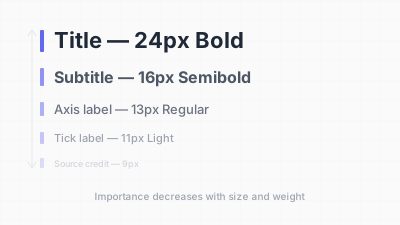
타이포그래피 위계: 제목, 부제목, 축 레이블, 세부 텍스트의 크기·굵기 차이 / Typographic hierarchy: size and weight differences across title, subtitle, axis labels, and fine print
핵심 아이디어 / Key Ideas
- 3~4단계 위계가 대부분의 시각화에 충분합니다: 제목, 부제목/주석, 축 레이블, 세부 사항. 더 많은 단계는 혼란을, 더 적은 단계는 레이블 부재를 초래합니다.
- Three to four levels of hierarchy are sufficient for most visualizations: title, subtitle/annotation, axis labels, and fine print. More levels create confusion; fewer leave the chart unlabeled.
- 크기 비율: 제목은 본문(축 레이블)의 1.5~2배여야 합니다. 임의의 크기 대신 일관된 타입 스케일(예: 12, 14, 18, 24)을 사용합니다.
- Size ratio: the title should be 1.5–2x the size of body text (axis labels). Use a consistent type scale (e.g., 12, 14, 18, 24) rather than arbitrary sizes.
- 굵기 대비: 제목과 핵심 주석에 볼드, 나머지는 보통 굵기. 모든 텍스트에 볼드를 사용하면 위계가 파괴됩니다.
- Weight contrast: bold for titles and key annotations, regular weight for everything else. Avoid using bold for all text, which destroys hierarchy.
- 폰트 조합: 차트 전체에 하나의 산세리프 폰트면 대체로 충분합니다. 조합한다면 세리프 하나와 산세리프 하나를 사용합니다. 두 개 이상의 서체는 절대 사용하지 않습니다.
- Font pairing: one sans-serif font for the entire chart is usually sufficient. If pairing, use one serif and one sans-serif. Never use more than two typefaces.
- 직접 레이블링이 범례보다 우선합니다: 데이터 시리즈에 직접 레이블을 배치하면 범례 교차 참조의 인지 비용이 사라집니다. 꺾은선 그래프에서 특히 효과적입니다.
- Direct labeling over legends: placing labels directly on or next to data series eliminates the cognitive cost of cross-referencing a legend. This is particularly effective in line graphs.
- 일관된 정렬: 제목은 좌측 정렬, 주석은 좌측 또는 중앙 정렬, 출처는 우측 정렬. 모든 것을 중앙 정렬하면 약한 시각적 축이 생깁니다.
- Consistent alignment: left-align titles, left-align or center-align annotations, right-align source credits. Avoid centering everything, which creates a weak visual axis.
좋은 예시 / Good Examples
- 뉴욕 타임스 그래픽 팀은 엄격한 타이포그래피 위계를 사용합니다: 볼드 산세리프 헤드라인, 핵심 인사이트가 담긴 가벼운 부제목, 작은 축 레이블, 아주 작은 출처/크레딧 표기. 모든 텍스트 요소가 명확한 역할을 갖습니다.
- The New York Times graphics team uses a strict typographic hierarchy: bold sans-serif headline, lighter subtitle with the key insight, small axis labels, and tiny source/credit lines. Every text element has a clear role.
- 공유된 단일 제목과 패널별 라벨이 가벼운 굵기로 표시되는 스몰 멀티플. 위계를 통해 모든 패널이 하나의 시각화에 속하면서도 각 패널이 고유한 정체성을 갖는다는 것이 명확해집니다.
- Small multiples with a single shared title and per-panel labels in a lighter weight. The hierarchy makes it clear that all panels are part of one visualization while each panel has its own identity.
- 주요 이벤트가 가는 지시선으로 데이터에 연결된 짧은 이탤릭 주석으로 표시되는 주석 달린 꺾은선 그래프. 주석 텍스트는 제목보다 작지만 축 레이블보다 커서 위계적 위치에 정확히 놓입니다.
- Annotated line graphs where key events are marked with brief, italicized annotations connected to the data by thin leader lines. The annotation text is smaller than the title but larger than axis labels, sitting precisely in its hierarchical position.
안티 패턴 / Anti-Patterns
- 모든 텍스트가 같은 크기와 굵기: 차트가 진입점 없는 평평한 텍스트 필드가 됩니다. 시청자의 시선이 방황합니다.
- All text the same size and weight: the chart becomes a flat field of text with no entry point. The viewer's eye wanders aimlessly.
- 장식적이거나 필기체 폰트의 제목: 작은 크기나 낮은 해상도에서 가독성이 급락합니다. 데이터 시각화는 청첩장이 아닙니다.
- Titles in decorative or script fonts: legibility collapses, especially at smaller sizes or lower resolutions. Data visualization is not a wedding invitation.
- 세로 축 레이블: 텍스트를 90도 회전하면 읽기가 훨씬 어려워집니다. 축 레이블이 길면 가로 막대 차트나 약어를 고려합니다.
- Vertical axis labels: rotating text 90 degrees makes it significantly harder to read. If axis labels must be long, consider a horizontal bar chart or abbreviations.
- 긴 레이블의 전부 대문자: 대문자 텍스트는 몇 단어 이상에서 혼합 케이스보다 10~20% 느리게 읽힙니다. 전부 대문자는 매우 짧은 레이블(축 제목의 "YEAR"이나 "GDP")에만 사용합니다.
- All-caps for long labels: uppercase text is 10–20% slower to read than mixed case for strings longer than a few words. Reserve all-caps for very short labels (axis titles like "YEAR" or "GDP").
- 지나치게 작은 텍스트: 화면에서 10px 미만(또는 인쇄물에서 7pt 미만)의 축 레이블은 많은 시청자에게 읽을 수 없으며 접근성 기준에 미달합니다. WCAG는 웹에서 본문 텍스트 최소 16px를 권장합니다.
- Overly small text: axis labels below 10px on screen (or 7pt in print) are illegible for many viewers and fail accessibility standards. WCAG recommends a minimum of 16px for body text on the web.
- 경쟁하는 강조: 제목과 주석이 모두 볼드, 크기, 컬러로 강조되면 어느 쪽도 지배하지 못하고 위계가 무너집니다.
- Competing emphasis: when both the title and an annotation are bold, large, and colored, neither dominates and the hierarchy collapses.
더 읽어보기 / Further Reading
- Lupton, E. (2010). Thinking with Type: A Critical Guide for Designers, Writers, Editors, & Students (2nd ed.). Princeton Architectural Press.
- Schwabish, J. (2021). Better Data Visualizations: A Guide for Scholars, Researchers, and Wonks. Columbia University Press.
- Few, S. (2012). Show Me the Numbers (2nd ed.). Analytics Press.
- Butterick, M. (2018). Practical Typography. https://practicaltypography.com/