설명 / Description
1200픽셀 너비로 디자인된 차트는 375픽셀에서 종종 실패합니다. 축 레이블이 겹치고, 범례가 어색하게 줄바꿈되고, 30개 카테고리의 바 차트가 읽을 수 없는 조각으로 압축되고, 500개 포인트의 산점도가 불투명한 덩어리가 됩니다. 데스크톱 디자이너의 탈출구인 호버 기반 툴팁은 터치 기기에서 사용할 수 없습니다. 그러나 모바일 기기가 전 세계 웹 트래픽의 60% 이상을 차지하며, 태블릿과 폰에서 보는 대시보드가 예외가 아니라 표준입니다. 반응형 시각화는 선택적 장식이 아니라 디자인 요구사항입니다.
Refactoring UI의 철학이 직접 적용됩니다: "단순히 크기를 줄이지 마라 — 제약 조건에 맞게 재설계하라." 반응형 웹 디자인은 십 년 전 이 교훈을 배웠습니다: 데스크톱 내비게이션 바는 375px로 우아하게 축소되지 않고 — 햄버거 메뉴로 변형됩니다. 시각화도 같은 변형의 의지가 필요합니다. 6개 그룹과 그룹당 4개 시리즈의 그룹화 바 차트는 데스크톱 모니터에서는 작동하지만 폰에서는 누적 바, 소형 다중 그리드, 또는 정렬 가능한 테이블이 되어야 합니다. 산점도는 가로축이 2차원 판독에 너무 압축될 때 스트립 플롯이나 비스웜 플롯으로 교체될 수 있습니다.
반응형 시각화의 실무 프레임워크는 세 수준으로 작동합니다. 리플로우: 가장 단순한 수준에서 차트와 패널이 다중 컬럼 그리드에서 단일 컬럼으로 재배치됩니다. 리사이즈: 차트 자체가 적응합니다 — 눈금 레이블 수 축소, 축 레이블 약어 사용, 범례를 오른쪽에서 차트 아래로 이동, 인터랙티브 요소의 터치 타겟 크기 증가. 리디자인: 좁은 너비에서 차트 유형이 완전히 변경됩니다 — 라인 차트가 스파크라인으로, 히트맵이 순위 목록으로, 다중 시리즈 차트가 상위 3개 시리즈만 보여주고 "더 보기" 토글을 추가합니다. 각 수준은 더 많은 디자인 노력이 필요하지만, 모바일 경험을 크게 개선합니다.
A chart designed at 1200 pixels wide often fails at 375 pixels. Axis labels overlap. Legends wrap awkwardly. Bar charts with 30 categories compress into unreadable slivers. Scatterplots with 500 points become opaque blobs. Hover-based tooltips — the desktop designer's escape hatch for detail — are unavailable on touch devices. Yet mobile devices account for over 60% of web traffic globally, and dashboards viewed on tablets and phones are the norm, not the exception. Responsive visualization is not optional decoration; it is a design requirement.
The Refactoring UI philosophy applies directly: "Don't just scale things down — redesign for the constraints." Responsive web design learned this lesson a decade ago: a desktop navigation bar does not shrink gracefully to 375px — it transforms into a hamburger menu. Visualizations need the same willingness to transform, not just shrink. A grouped bar chart with 6 groups and 4 series per group might work on a desktop monitor but needs to become a series of stacked bars, a small-multiples grid, or a sortable table on a phone. A scatterplot might swap to a strip plot or a beeswarm plot when the horizontal axis becomes too compressed for two-dimensional reading. A complex dashboard might collapse into a single-column feed of summary cards with expandable detail.
The practical framework for responsive visualization operates at three levels. Reflow: at the simplest level, charts and panels rearrange from a multi-column grid to a single column, like responsive web layout. Resize: the chart itself adapts — reducing the number of tick labels, abbreviating axis labels, moving the legend from the right side to below the chart, increasing touch target sizes for interactive elements. Redesign: at narrow widths, the chart type changes entirely — a line chart might become a sparkline, a heatmap might become a ranked list, a multi-series chart might show only the top 3 series with a "show more" toggle. Each level requires more design effort, but each also significantly improves the mobile experience.
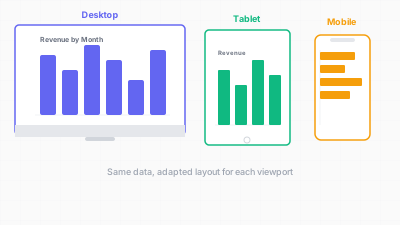
화면 크기에 따라 리플로우, 리사이즈, 리디자인 — 축소가 아닌 적응 / Reflow, resize, redesign across screen sizes — adaptation, not shrinkage
핵심 아이디어 / Key Ideas
- 모바일 퍼스트 디자인: 375px 너비에서 차트를 디자인하는 것부터 시작하세요. 거기서 작동하면 1200px로 확대하는 것은 간단합니다 — 세부를 추가하면 됩니다. 축소가 문제를 일으킵니다.
- Mobile-first design: start by designing the chart at 375px width. If it works there, scaling up to 1200px is straightforward — you add detail. Scaling down is where things break.
- 차트용 반응형 브레이크포인트: 최소 세 가지 상태를 정의하세요: 좁음(< 480px), 중간(480–768px), 넓음(> 768px). 각 브레이크포인트에서 어떤 요소가 표시, 숨김, 변환되는지 지정합니다.
- Responsive breakpoints for charts: define at least three states: narrow (< 480px), medium (480–768px), and wide (> 768px). At each breakpoint, specify which elements are shown, hidden, or transformed.
- 레이블 밀도 줄이기: 좁은 너비에서 2~3번째 눈금 레이블만 표시하고, 월 이름을 약어("January" 대신 "Jan")로, 레이블 회전은 최후의 수단으로만 사용합니다(회전된 텍스트는 읽기 어려움).
- Reduce label density: at narrow widths, show every 2nd or 3rd tick label, abbreviate month names ("Jan" instead of "January"), rotate labels only as a last resort (rotated text is harder to read).
- 범례 배치: 측면 범례는 좁은 화면이 감당할 수 없는 수평 공간을 소모합니다. 모바일에서는 범례를 차트 아래로 이동하거나, 데이터에 직접 레이블을 달아 완전히 제거하세요.
- Legend placement: side legends consume horizontal space that narrow screens cannot spare. Move legends below the chart on mobile, or eliminate them entirely in favor of direct labels on the data.
- 터치 친화적 인터랙션: 호버 툴팁은 터치 기기에서 작동하지 않습니다. 탭하면 나타나고 닫을 때까지 유지되는 툴팁으로 대체하세요. 터치 타겟(데이터 포인트, 필터 버튼)이 최소 44x44 픽셀이어야 합니다.
- Touch-friendly interactions: hover tooltips do not work on touch devices. Replace them with tap-to-reveal tooltips that persist until dismissed. Ensure touch targets (data points, filter buttons) are at least 44x44 pixels.
- 차트 유형 대체: 특정 너비에서 차트 유형이 실패하면, 같은 인사이트를 전달하는 다른 유형으로 대체합니다. 스크롤이 필요한 30카테고리 수평 바 차트는 "전체 보기" 링크가 있는 상위 10개 바 차트가 될 수 있습니다.
- Chart type substitution: when a chart type fails at a given width, substitute a different type that communicates the same insight. A 30-category horizontal bar chart that requires scrolling might become a top-10 bar chart with a "see all" link.
- 미디어 쿼리보다 컨테이너 쿼리: 차트가 유연한 대시보드 패널에 임베드될 때, 차트는 뷰포트 너비가 아닌 컨테이너 너비에 반응해야 합니다. CSS 컨테이너 쿼리와 ResizeObserver가 이를 가능하게 합니다.
- Container queries over media queries: when charts are embedded in flexible dashboard panels, the chart should respond to its container width, not the viewport width. CSS container queries and ResizeObserver enable this.
좋은 예시 / Good Examples
- 뉴욕 타임스 모바일 데이터 스토리: 복잡한 데스크톱 차트가 더 단순하고 길쭉한 모바일 버전 — 종종 세로 바 차트나 주석이 달린 라인 차트 — 으로 대체됩니다. 모바일 디자인은 열화된 데스크톱 디자인이 아니라, 모바일 맥락을 위한 다른 의도적 디자인입니다.
- The New York Times mobile data stories: complex desktop charts are replaced with simpler, taller mobile versions — often vertical bar charts or annotated line charts that scroll naturally. The mobile design is not a degraded desktop design; it is a different, intentional design for the mobile context.
- Observable Plot의 반응형 기본값: Plot의
width옵션은 기본적으로 컨테이너 너비이며, 자동 생성 눈금 레이블이 가용 공간에 적응합니다. 같은 플롯 사양이 320px과 1200px 모두에서 가독 가능한 차트를 생성합니다. - Observable Plot's responsive defaults: Plot's
widthoption defaults to the container width, and its auto-generated tick labels adapt to available space. The same plot specification produces a readable chart at both 320px and 1200px. - FiveThirtyEight 선거 모델: 데스크톱 버전은 호버 상태가 있는 상세 인터랙티브 맵을 보여줍니다. 모바일 버전은 확률 바가 있는 핵심 주 목록으로 단순화되어 세로 스크롤과 탭 인터랙션에 최적화됩니다.
- FiveThirtyEight's election model: the desktop version showed detailed interactive maps with hover states. The mobile version simplified to a list of key states with probability bars, optimized for vertical scrolling and tap interaction.
- Datawrapper의 반응형 차트 임베드: 차트가 임베드 너비에 따라 레이블 밀도, 범례 위치, 주석 배치를 자동 조정합니다. 디자이너가 차트를 한 번 정의하면 렌더링이 적응합니다.
- Datawrapper's responsive chart embeds: charts automatically adjust label density, legend position, and annotation placement based on embed width. The designer defines the chart once, and the rendering adapts.
- 모바일 대시보드의 스파크라인: 전체 시계열 차트가 맞지 않을 때, KPI 숫자 옆에 임베드된 스파크라인이 최소한의 수평 공간으로 트렌드를 전달합니다.
- Sparklines in mobile dashboards: when a full time-series chart cannot fit, a sparkline embedded next to a KPI number communicates the trend in minimal horizontal space.
안티 패턴 / Anti-Patterns
- 축소해서 맞추기: 1200px 차트를 375px에서 전체 SVG를 스케일링하여 렌더링합니다. 모든 텍스트가 읽을 수 없이 작아지고, 탭 타겟이 사용 불가능한 크기로 줄어듭니다.
- Shrink-to-fit: rendering a 1200px chart at 375px by scaling the entire SVG down. All text becomes illegibly small, and tap targets shrink below usable size.
- 모바일에서의 수평 스크롤: 뷰포트보다 넓은 차트로 수평 스크롤이 필요합니다. 모바일 사용자는 세로 스크롤을 기대합니다; 수평 스크롤은 예상 밖이고, 어렵고, 보통 디자인 실패를 나타냅니다.
- Horizontal scroll on mobile: a chart that is wider than the viewport and requires horizontal scrolling. Mobile users expect vertical scroll; horizontal scroll is unexpected, difficult, and usually indicates a design failure.
- 겹치는 레이블: 적응형 눈금 전략이 구현되지 않아 좁은 너비에서 축 레이블이 충돌합니다. 레이블이 타이포그래피 난장판이 됩니다.
- Overlapping labels: axis labels that collide at narrow widths because no adaptive tick strategy was implemented. The labels become a typographic pileup.
- 좁은 화면의 측면 범례: 375px 화면에서 150px의 수평 공간을 소모하는 범례, 차트 영역에 225px만 남김 — 신용카드 폭보다 좁습니다.
- Side-placed legends on narrow screens: a legend consuming 150px of horizontal space on a 375px screen, leaving only 225px for the chart area — less than the width of a credit card.
- 데스크톱 전용 툴팁: 중요한 정보(정확한 값, 카테고리 이름)를 제공하는 호버 기반 툴팁에 탭 대안이 없습니다. 모바일 사용자는 이 정보에 전혀 접근할 수 없습니다.
- Desktop-only tooltips: hover-based tooltips that provide critical information (exact values, category names) with no tap equivalent. Mobile users cannot access this information at all.
- 모든 차트에 동일한 브레이크포인트: 같은 반응형 규칙을 바 차트와 산점도에 적용합니다. 다른 차트 유형은 다른 실패 모드를 가지며 다른 적응 전략이 필요합니다.
- Identical breakpoints for all charts: applying the same responsive rules to a bar chart and a scatterplot. Different chart types have different failure modes and need different adaptive strategies.
더 읽어보기 / Further Reading
- Wathan, A., & Schoger, S. (2018). Refactoring UI. Self-published.
- Horak, T., et al. (2021). Responsive Visualization Design for Mobile Devices. Proceedings of MobileHCI 2021.
- Andrews, K. (2018). Responsive Data Visualisation. Proceedings of the Eurographics Conference on Visualization (EuroVis).
- Moritz, D., & Fisher, D. (2018). Visualizing a Million Time Series with the Density Line Chart. arXiv preprint arXiv:1808.06019.
- Datawrapper Blog: "How we made our charts responsive" — https://blog.datawrapper.de/