설명 / Description
시각화 디자인에서 흔한 본능은 모든 것을 한꺼번에 보여주는 것입니다 — 모든 데이터 포인트, 모든 차원, 모든 주석, 모든 컨트롤. 관객에게 모든 정보를 주고 필요한 것을 찾게 하겠다는 관대한 논리입니다. 하지만 결과는 도움의 반대입니다. 세부 사항으로 과부하된 차트는 관객이 데이터의 멘탈 모델을 형성하기 전에 지각 시스템을 압도합니다. 복잡함을 보고 물러납니다. 점진적 공개는 정보를 계층화하여 이를 해결합니다: 핵심 개요를 먼저 보여주고, 관객이 인터랙션 — 호버, 클릭, 필터링, 줌 — 을 통해 요청할 때만 더 깊은 세부 사항을 드러냅니다.
Ben Shneiderman은 이를 시각적 정보 탐색 만트라로 공식화했습니다: "개요 먼저, 확대와 필터, 그리고 세부 사항은 요청 시." 이 세 단계 시퀀스는 인간이 자연스럽게 낯선 정보를 탐색하는 방식과 일치합니다. 첫째, 관객은 오리엔테이션이 필요합니다 — 이 데이터셋은 무엇에 관한 것인가, 전체 형태는 어떤가, 극값은 무엇인가? 개요 시각화(요약 바 차트, 트렌드 라인, 단계구분도)가 이 질문에 답합니다. 둘째, 관객은 초점을 좁힙니다 — 특정 기간으로 필터링, 지역으로 확대, 카테고리 선택. 셋째, 관객은 구체적인 정보를 원합니다 — 데이터 포인트의 정확한 값, 집계 뒤의 원시 레코드, 마크에 연관된 메타데이터. 툴팁, 상세 패널, 연결된 데이터 테이블이 이를 요청 시 제공합니다.
이 원칙은 Refactoring UI의 인터페이스 복잡성에 대한 가이드와 직접 병행합니다: "모든 옵션을 앞에 내놓아 사용자를 압도하지 마세요. 가장 단순한 유용 버전으로 시작하고 점진적으로 복잡성을 드러내세요." 차트 빌더에서는 합리적인 기본 차트 유형으로 시작하고 "고급" 토글을 클릭할 때만 고급 커스터마이징을 보여주는 것을 의미합니다. 대시보드에서는 상단에 KPI 요약 숫자를 보여주고 사용자가 지원 차트로 드릴다운하게 하는 것입니다. 첫 뷰는 가장 일반적인 질문에 답해야 하고, 더 깊은 뷰는 후속 질문에 답해야 합니다.
A common instinct in visualization design is to show everything at once — every data point, every dimension, every annotation, every control. The reasoning is generous: give the viewer all the information and let them find what they need. But the result is the opposite of helpful. A chart overloaded with detail overwhelms the viewer's perceptual system before they can form a mental model of the data. They see complexity and retreat. Progressive disclosure solves this by layering information: show the essential overview first, and reveal deeper detail only when the viewer asks for it through interaction — hovering, clicking, filtering, or zooming.
Ben Shneiderman formalized this as the Visual Information Seeking Mantra: "Overview first, zoom and filter, then details on demand." This three-stage sequence matches how humans naturally explore unfamiliar information. First, the viewer needs orientation — what is this dataset about, what is the overall shape, what are the extremes? An overview visualization (a summary bar chart, a trend line, a choropleth) answers these questions. Second, the viewer narrows their focus — they filter to a time period, zoom into a region, select a category. The visualization responds by showing a more focused subset at higher resolution. Third, the viewer wants specifics — the exact value of a data point, the underlying records behind an aggregate, the metadata associated with a mark. A tooltip, a detail panel, or a linked data table provides this on demand.
This principle directly parallels Refactoring UI's guidance on interface complexity: "Don't overwhelm the user with every option upfront. Start with the simplest useful version and progressively reveal complexity." In a chart builder, this might mean starting with a sensible default chart type and revealing advanced customization only when the user clicks an "Advanced" toggle. In a dashboard, it means showing KPI summary numbers at the top and letting users drill down into the supporting charts. The first view should answer the most common question; deeper views should answer follow-up questions.
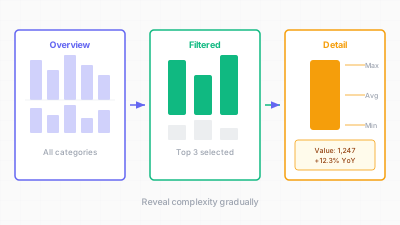
개요에서 세부로 — 관객의 분석적 의도에 따라 정보를 계층적으로 공개한다 / From overview to detail — layering information according to the viewer's analytical intent
핵심 아이디어 / Key Ideas
- 개요 먼저: 모든 시각화의 초기 뷰는 큰 그림을 전달해야 합니다 — 전체 트렌드, 분포 형태, 지배적 패턴. 이 뷰는 5초 이내에 읽을 수 있어야 합니다.
- Overview first: the initial view of any visualization should communicate the big picture — the overall trend, the distribution shape, the dominant pattern. This view should be readable in under 5 seconds.
- 확대와 필터: 관객이 관심 있는 부분집합으로 데이터를 좁힐 수 있는 인터랙션 메커니즘(브러싱, 드롭다운, 슬라이더, 검색)을 제공합니다. 확대된 뷰는 부분집합의 시각적 해상도를 높이면서 전체와의 관계 인식을 유지해야 합니다.
- Zoom and filter: provide interaction mechanisms (brushing, dropdowns, sliders, search) that let the viewer narrow the data to a subset of interest. The zoomed view should increase the visual resolution of the subset while maintaining awareness of its relationship to the whole.
- 세부 사항은 요청 시: 데이터 포인트 위에 호버하여 정확한 값을 보거나, 바를 클릭하여 원시 레코드를 보거나, 노드를 확장하여 자식을 봅니다. 세부 사항은 항상 사용 가능하지만 강제되지는 않습니다.
- Details on demand: hovering over a data point to see its exact value, clicking a bar to see the underlying records, expanding a node to see its children. Detail is always available but never forced.
- 슈나이더만의 만트라를 디자인 사양으로: "개요, 확대, 필터, 세부"를 요구사항 체크리스트로 취급합니다. 각 시각화에 대해 각 레벨이 무엇을 보여주고 어떤 인터랙션이 레벨 간 전환하는지 정의합니다.
- Shneiderman's mantra as design spec: treat "overview, zoom, filter, details" as a requirements checklist. For each visualization, define what each level shows and what interaction transitions between them.
- 초기 인지 부하 줄이기: 더 단순한 첫 뷰가 관객을 더 빨리 오리엔테이션시킵니다. 개요에서 이미 멘탈 모델이 있기 때문에 더 깊은 레이어 탐색에 주의를 투자할 수 있습니다.
- Reduce initial cognitive load: a simpler first view gets the viewer oriented faster. They can then invest attention in exploring deeper layers because they already have a mental model from the overview.
- 인터랙션 어포던스: 더 많은 세부 사항이 사용 가능하다는 것을 명확히 하세요. 미묘한 단서 — 호버 커서 변경, "클릭하여 탐색" 레이블, 보이는 스크롤바 — 가 시각화가 탐색 가능함을 알려줍니다.
- Interaction affordances: make it clear that more detail is available. A subtle cue — a hover cursor change, a "click to explore" label, a visible scrollbar — signals that the visualization is explorable, not static.
좋은 예시 / Good Examples
- Google Analytics 실시간 대시보드: 최상위 뷰는 단일 숫자(활성 사용자)와 트렌드 스파크라인을 보여줍니다. 클릭하면 페이지별, 지역별, 트래픽 소스별 분류가 드러납니다 — 각 레이어가 최상위 뷰가 요약한 세부를 추가합니다.
- Google Analytics real-time dashboard: the top-level view shows a single number (active users) and a trend sparkline. Clicking reveals a breakdown by page, by geography, by traffic source — each layer adding detail that the top-level view summarized away.
- Observable의 줌 가능한 트리맵: 초기 뷰는 최상위 계층을 보여줍니다. 노드를 클릭하면 자식으로 확대하여 더 세밀한 분할을 드러냅니다. 관객이 시각화 자체와의 직접 인터랙션으로 세부 수준을 제어합니다.
- Observable's zoomable treemaps: the initial view shows the top-level hierarchy. Clicking a node zooms into its children, revealing a finer partition. The viewer controls the level of detail through direct interaction with the visualization itself.
- 뉴욕 타임스 선거 바늘: 선거 당일 밤, 초기 뷰는 승리 확률을 보여주는 하나의 바늘이었습니다. 클릭하면 주별 분류, 투표 합계, 역사적 비교가 드러납니다. 원하는 이에게 복잡성이 있었지만, 헤드라인은 단일 숫자였습니다.
- The New York Times election needle: on election night, the initial view was a single needle showing win probability. Clicking revealed state-by-state breakdowns, vote totals, and historical comparisons. The complexity was there for those who wanted it, but the headline was a single number.
- Crossfilter 대시보드(예: dc.js): 한 차트의 시간 범위를 브러싱하면 대시보드의 모든 다른 차트가 동시에 필터링됩니다. 관객이 시간적 부분집합을 탐색하는 동안 개요가 보입니다.
- Crossfilter dashboards (e.g., dc.js): brushing a time range on one chart simultaneously filters all other charts on the dashboard. The overview remains visible while the viewer explores a temporal subset.
- 툴팁 + 클릭 패턴: 데이터 포인트 위에 호버하면 간단한 툴팁(값, 레이블), 포인트를 클릭하면 전체 메타데이터, 이력, 관련 레코드가 있는 상세 사이드 패널이 열립니다.
- Tooltip + click pattern: hover over a data point to see a brief tooltip (value, label); click the point to open a detailed side panel with full metadata, history, and related records.
안티 패턴 / Anti-Patterns
- 첫 로드에 모든 것: 15개 차트, 차트당 200개 데이터 포인트가 동시에 보이며 위계나 인터랙션 없는 대시보드. 관객은 "분석 마비"를 경험합니다 — 어디서 시작할지 모르는 과다 정보.
- Everything on first load: a dashboard that renders 15 charts, 200 data points per chart, all visible simultaneously with no hierarchy or interaction. The viewer experiences "analysis paralysis" — too much information to know where to start.
- 어포던스 없는 숨겨진 정보: 호버나 클릭으로 세부가 존재하지만, 차트가 인터랙티브임을 시각적으로 알려주는 것이 없습니다. 관객은 정적 이미지로 취급하고 더 깊은 레이어를 놓칩니다.
- Hidden information with no affordance: detail exists on hover or click, but nothing visual signals that the chart is interactive. The viewer treats it as a static image and misses the deeper layers.
- 개요 없는 세부: 먼저 요약을 제공하지 않고 세밀한 뷰(개별 데이터 포인트, 원시 레코드)로 바로 점프합니다. 관객은 나무는 보지만 숲은 볼 수 없습니다.
- Detail without overview: jumping directly to a granular view (individual data points, raw records) without first providing a summary. The viewer sees trees but not the forest.
- 되돌아갈 수 없는 드릴다운: 브레드크럼, 뒤로 가기 버튼, 맥락 표시 없이 상세 뷰로 클릭합니다. 관객이 데이터 계층 내에서 자신의 위치를 잃습니다.
- Drill-down with no way back: clicking into a detail view with no breadcrumb, back button, or context indicator. The viewer loses their sense of position within the data hierarchy.
- 스크롤하면 모든 것 공개: 수직 스크롤로 단일 칼럼에 쌓인 30개 차트를 "점진적으로 공개". 이것은 점진적 공개가 아니라 긴 페이지입니다. 진정한 점진적 공개는 스크롤 위치가 아니라 관객의 분석적 의도에 의해 구동됩니다.
- Scroll-to-reveal everything: using vertical scrolling to "progressively disclose" 30 charts stacked in a single column. This is not progressive disclosure — it is a long page. True progressive disclosure is driven by the viewer's analytical intent, not their scroll position.
- 유일한 데이터 접근 수단으로서의 툴팁: 정확한 값을 읽는 유일한 방법이 포인트 하나하나에 호버하는 것일 때. 많은 값을 비교해야 하는 작업에는 정렬 가능한 테이블이나 직접 레이블을 제공하세요.
- Tooltips as the only data access: when the only way to read exact values is to hover over each point one at a time. For tasks that require comparing many values, provide a sortable table or direct labels.
더 읽어보기 / Further Reading
- Shneiderman, B. (1996). The Eyes Have It: A Task by Data Type Taxonomy for Information Visualizations. Proceedings of the IEEE Symposium on Visual Languages, 336–343.
- Wathan, A., & Schoger, S. (2018). Refactoring UI. Self-published.
- Munzner, T. (2014). Visualization Analysis and Design. CRC Press.
- Heer, J., & Shneiderman, B. (2012). Interactive Dynamics for Visual Analysis. Communications of the ACM, 55(4), 45–54.
- Norman, D. (2013). The Design of Everyday Things (revised ed.). Basic Books.