설명 / Description
디자인에서 가장 마비시키는 측면 중 하나는 무한한 선택의 캔버스입니다. 축 레이블의 폰트 크기는 11px? 12px? 13px? 제목과 차트 영역 사이의 여백은 16px? 18px? 22px? 모든 치수가 연속 변수일 때, 디자이너는 수천 가지 미시적 결정에 직면하며, 이는 시간을 소모하고, 비일관성을 낳고, 명확한 오류 없이도 미묘하게 "어색한" 결과를 만듭니다. Adam Wathan과 Steve Schoger가 Refactoring UI에서 주장하듯이, 해결책은 미리 제한된 스케일을 정의하고 모든 결정을 그 스케일 내의 선택으로 제한하는 것입니다.
간격 스케일은 기하급수적 진행을 사용할 수 있습니다: 4, 8, 12, 16, 24, 32, 48, 64, 96, 128 픽셀. 타입 스케일은: 12, 14, 16, 18, 20, 24, 30, 36, 48, 60. 색상 팔레트는 5개의 회색(100, 200, 400, 600, 900)과 3개의 강조 강도를 제공할 수 있습니다. 이러한 시스템이 정의되면, 디자이너는 처음부터 값을 만들 필요가 없습니다. 차트 제목과 차트 영역 사이의 여백은 16 또는 24이지, 19가 아닙니다. 주석 폰트는 12 또는 14이지, 13이 아닙니다. 이 제약은 사소한 결정을 제거하고, 다중 차트 대시보드 전반에 일관성을 강제하며, 모든 측정값이 공유 비율을 통해 다른 측정값과 관련되기 때문에 디자인이 응집력 있게 느껴지게 합니다.
데이터 시각화에서 특히, 제한된 스케일은 빠르게 증식하는 문제를 해결합니다: 대시보드에는 많은 차트가 있고, 각각 자체 제목, 부제, 축, 레이블, 여백, 패딩이 있습니다. 공유 스케일 없이는 각 차트가 자체적인 맞춤 크기로 표류하여 대시보드가 위원회가 모은 콜라주처럼 보입니다. 공유 스케일이 있으면, 다른 팀원이 다른 날에 디자인한 차트도 같은 유한한 값 풀에서 가져오기 때문에 정렬이 맞춰집니다. 시스템이 디자이너가 됩니다.
One of the most paralyzing aspects of design is the infinite canvas of choices. What font size should an axis label be — 11px? 12px? 13px? What margin should separate a title from the chart area — 16px? 18px? 22px? When every dimension is a continuous variable, the designer faces thousands of micro-decisions that consume time, produce inconsistency, and yield results that feel subtly "off" without any single obvious error. The solution, as Adam Wathan and Steve Schoger argue in Refactoring UI, is to define constrained scales in advance and limit every decision to a choice from that scale.
A spacing scale might use a geometric progression: 4, 8, 12, 16, 24, 32, 48, 64, 96, 128 pixels. A type scale might be: 12, 14, 16, 18, 20, 24, 30, 36, 48, 60. A color palette might offer five greys (100, 200, 400, 600, 900) and three accent intensities. With these systems defined, the designer never has to invent a value from scratch. The margin between chart title and chart area is 16 or 24, not 19. The annotation font is 12 or 14, not 13. This constraint eliminates trivial decisions, enforces consistency across a multi-chart dashboard, and makes the design feel cohesive because every measurement relates to every other measurement through a shared ratio.
In data visualization specifically, constrained scales solve a problem that multiplies rapidly: dashboards contain many charts, each with its own title, subtitle, axes, labels, margins, and padding. Without a shared scale, each chart drifts into its own bespoke sizing, and the dashboard looks like a collage assembled by a committee. With a shared scale, even charts designed by different team members on different days snap into alignment because they draw from the same finite pool of values. The system becomes the designer.
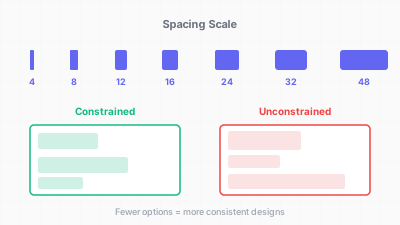
제한된 디자인 스케일이 일관성을 보장한다 / Constrained design scales ensure consistency
핵심 아이디어 / Key Ideas
- 간격 스케일: 값 세트(예: 4, 8, 12, 16, 24, 32, 48, 64)를 정의하고 이것만 여백, 패딩, 갭에 사용합니다. 4px 또는 8px 기본 단위에 배수를 적용하면 잘 작동합니다.
- Spacing scale: define a set of values (e.g., 4, 8, 12, 16, 24, 32, 48, 64) and use only these for margins, padding, and gaps. A base unit of 4px or 8px with multiples works well.
- 타입 스케일: 폰트 크기(예: 12, 14, 16, 18, 20, 24, 30, 36)를 정의하고 각각에 의미적 역할을 할당합니다 — 축 레이블, 주석, 부제, 제목, 히어로 숫자. 스케일에 없는 폰트 크기를 사용하지 마세요.
- Type scale: define font sizes (e.g., 12, 14, 16, 18, 20, 24, 30, 36) and assign each a semantic role — axis label, annotation, subtitle, title, hero number. Never pick a font size not on the scale.
- 색상 팔레트 제약: 팔레트를 5~8개의 중성 회색과 2~3개의 강조색으로 제한하고, 각각에 밝음/중간/어두움 변형을 정의합니다. 시각화의 모든 색상은 이 팔레트에서 나와야 합니다.
- Color palette constraints: limit the palette to 5–8 neutral greys and 2–3 accent colors, each with defined light/medium/dark variants. Every color in the visualization must come from this palette.
- 선/테두리 두께: 작은 세트(0.5, 1, 1.5, 2, 3 픽셀)를 정의하고 역할을 할당합니다: 격자선에 0.5px, 축선에 1px, 데이터 선에 1.5px, 강조 데이터 선에 2px, 주석 테두리에 3px.
- Stroke and border widths: define a small set (0.5, 1, 1.5, 2, 3 pixels) and assign them to roles: 0.5px for gridlines, 1px for axis lines, 1.5px for data lines, 2px for highlighted data lines, 3px for annotation borders.
- 불투명도 스케일: 임의의 투명도 값 대신, 세트를 정의합니다: 10%, 25%, 40%, 60%, 80%, 100%. 배경 채우기, 약화된 요소, 호버 상태에 일관되게 사용합니다.
- Opacity scale: instead of arbitrary transparency values, define a set: 10%, 25%, 40%, 60%, 80%, 100%. Use these consistently for background fills, de-emphasized elements, and hover states.
- 매직 넘버 대신 디자인 토큰: 스케일을 명명된 변수(CSS 커스텀 프로퍼티, Tailwind 설정, JSON 토큰 파일)로 인코딩하여 시스템의 모든 차트가 원시 숫자가 아닌 토큰을 참조하도록 합니다.
- Design tokens over magic numbers: encode the scale as named variables (CSS custom properties, Tailwind config, or a JSON token file) so that every chart in the system references the token, not a raw number.
좋은 예시 / Good Examples
- Tailwind CSS 기본 스케일: Tailwind의 간격 스케일(0, 1, 2, 3, 4, 5, 6, 8, 10, 12, 16, 20, 24, ...)은 0.25rem 단위로, 제한된 스케일이 모든 레이아웃 요구를 충족할 수 있음을 보여줍니다. 데이터 시각화 디자인 시스템도 같은 철학을 채택할 수 있습니다.
- Tailwind CSS default scale: Tailwind's spacing scale (0, 1, 2, 3, 4, 5, 6, 8, 10, 12, 16, 20, 24, ...) in units of 0.25rem demonstrates how a constrained scale can cover every layout need. Data visualization design systems can adopt the same philosophy.
- Financial Times Visual Vocabulary: FT 시각화팀은 모든 차트에 표준화된 타입 스케일, 색상 팔레트, 여백 시스템을 사용합니다. 차트가 인쇄물이든 디지털이든, 모든 값이 공유 시스템에서 나오기 때문에 시각적 언어가 일관됩니다.
- The Financial Times Visual Vocabulary: the FT's visualization team uses a standardized type scale, color palette, and margin system across all charts. Whether the chart appears in print or digital, the visual language is consistent because every value comes from a shared system.
- Observable Plot 기본값: Mike Bostock의 Observable Plot 라이브러리는 신중하게 선택된 기본 여백, 폰트 크기, 눈금 수를 제공합니다. 이 기본값은 제한된 스케일로 작동합니다 — 디자이너가 0에서 시작하는 것이 아니라 시스템 내에서 값을 수정합니다.
- Observable Plot defaults: Mike Bostock's Observable Plot library ships with carefully chosen default margins, font sizes, and tick counts. These defaults act as a constrained scale — the designer modifies values within a system rather than starting from zero.
- 대시보드 디자인 시스템(예: Grafana, Superset): 연속 슬라이더 대신 유한한 패널 크기, 간격 옵션, 타이포그래피 프리셋을 노출합니다.
- Dashboard design systems (e.g., Grafana, Superset) that expose a finite set of panel sizes, spacing options, and typography presets rather than continuous sliders.
안티 패턴 / Anti-Patterns
- "눈대중으로 맞추기": 여백, 패딩, 폰트 크기를 감각에 의존하여 "괜찮아 보일 때까지" 조정합니다. 서로 관계 없는 17px, 23px, 41px 같은 값을 만들어 일관되게 재현할 수 없습니다.
- "Just eyeball it": adjusting margins, padding, and font sizes by feel until they "look right." This produces values like 17px, 23px, and 41px that have no relationship to each other and cannot be reliably replicated.
- 일회성 오버라이드: 디자인 시스템이 있지만, "이 차트는 특별하니까"라며 개별 차트가 커스텀 값으로 오버라이드합니다. 시간이 지나면 오버라이드가 누적되고 시스템이 침식됩니다.
- One-off overrides: a design system is in place, but individual charts override it with custom values because "this chart is special." Over time, the overrides accumulate and the system erodes.
- 임의로 선택한 연속 색상 경사: 중간 단계를 정의하지 않고 시작 색과 끝 색만 선택합니다. 결과 그라데이션에 지각적 사각지대나 급격한 변화가 있을 수 있으며, 체계적 팔레트(ColorBrewer, viridis)라면 피할 수 있습니다.
- Continuous color ramps picked ad hoc: choosing a start color and end color without defining intermediate steps. The resulting gradient may have perceptual dead zones or jumps that a systematic palette (e.g., ColorBrewer, viridis) would avoid.
- 차트 간 비일관적 여백: 한 차트의 상단 여백이 32px, 인접 차트가 24px, 세 번째가 40px. 비일관성은 미묘하지만 대시보드가 해결되지 않은 느낌을 줍니다.
- Inconsistent margins across charts: one chart has 32px top margin, the adjacent chart has 24px, and a third has 40px. The inconsistency is subtle but the dashboard feels unresolved.
- 너무 많은 크기: 타입 스케일에 20개의 폰트 크기(10, 11, 12, 13, 14, 15, 16, ...)를 정의하면 목적이 무산됩니다. 스케일은 레벨 간 명확한 시각적 구분을 만드는 의미 있는 점프를 강제해야 합니다.
- Too many sizes: defining a type scale with 20 font sizes (10, 11, 12, 13, 14, 15, 16, ...) defeats the purpose. The scale should force meaningful jumps that produce clear visual distinction between levels.
더 읽어보기 / Further Reading
- Wathan, A., & Schoger, S. (2018). Refactoring UI. Self-published.
- Muller-Brockmann, J. (1981). Grid Systems in Graphic Design. Verlag Niggli.
- Boulton, M. (2009). A Practical Guide to Designing for the Web. Five Simple Steps.
- Material Design Type Scale: https://m3.material.io/styles/typography/
- Tailwind CSS Spacing Scale: https://tailwindcss.com/docs/customizing-spacing