설명 / Description
모든 시각화에는 기본 상태가 있습니다 — 사용자가 인터랙트하거나, 필터링하거나, 커스터마이즈하기 전에 보는 뷰. 이 기본 상태는 어떤 차트나 대시보드에서든 가장 많이 보여지는 상태입니다. 대부분의 사용자는 필터를 클릭하지 않습니다. 많은 사용자는 호버도 하지 않습니다. 일부는 3초만 보고 넘어갑니다. 기본 뷰가 그들의 가장 가능성 높은 질문에 답하지 않으면, 시각화는 가장 주목도가 높은 순간에 실패한 것입니다. 의도적 기본값이란 신문 편집자가 헤드라인에 들이는 것과 같은 주의를 기울여 이 첫 뷰를 디자인하는 것입니다: 관객이 어떤 작업도 하지 않고 즉시 핵심 인사이트를 전달해야 합니다.
Adam Wathan과 Steve Schoger의 Refactoring UI는 이것을 일반적인 UI 원칙으로 프레이밍합니다: "가장 일반적인 사용 사례를 먼저 디자인하고, 그것을 기본값으로 만들어라." 설정 페이지가 모든 옵션이 접힌 채 또는 모든 체크박스가 해제된 채 로드되어서는 안 됩니다 — 추천 설정이 미리 적용된 채 로드되어야 합니다. 날짜 선택기는 현재 날짜를 기본값으로, 1970년 1월 1일이 아니라. 데이터 시각화에서 이것은 직접 번역됩니다: 매출 대시보드는 "전체 기간"이 아니라 현재 기간(이번 달, 이번 분기)을 기본값으로 해야 합니다. 국가별 바 차트는 알파벳순이 아니라 값 내림차순으로 정렬되어야 합니다 — 가장 일반적인 질문이 "카자흐스탄은 어디?"가 아니라 "누가 가장 높은가?"이기 때문입니다.
이 철학은 기본 필터 상태를 넘어 기본 강조까지 확장됩니다. 가장 중요한 데이터 포인트가 시각적으로 강조되어야 합니다 — 현재 월은 볼드, 목표선은 그려지고, 리더는 주석이 달립니다. 대시보드는 만들기 가장 쉬웠던 지표가 아니라, 관객이 확인하러 온 지표로 시작해야 합니다. 기본 뷰는 편집적 결정입니다: 무엇을 먼저 보여줄지, 무엇을 정렬 기준으로 할지, 무엇을 강조할지 선택함으로써, 디자이너는 무엇이 가장 중요한지에 대한 판단을 표현하고 있습니다. 그 판단을 포기하면 — 모든 것을 정렬 없이, 필터 없이, 강조 없이 보여주면 — 관객에게 디자이너의 일을 떠넘기는 것입니다.
Every visualization has a default state — the view the user sees before they interact, filter, or customize. This default state is by far the most viewed state of any chart or dashboard. Most users will never click a filter. Many will never hover. Some will glance for three seconds and move on. If the default view does not answer their most likely question, the visualization has failed at the moment of highest attention. Intentional defaults mean designing this first view with the same care that a newspaper editor gives to a headline: it must convey the essential insight immediately, without requiring the viewer to do any work.
Adam Wathan and Steve Schoger's Refactoring UI frames this as a general UI principle: "Design the most common use case first, and make it the default." A settings page should not load with all options collapsed or all checkboxes unchecked — it should load with the recommended settings pre-applied. A date picker should default to the current date, not January 1, 1970. In data visualization, this translates directly: a sales dashboard should default to the current period (this month, this quarter), not "all time." A bar chart of countries should be sorted by value descending, not alphabetically — because the most common question is "who is highest?" not "where is Kazakhstan?" A trend chart should default to the last 12 months, not the last 7 days (which is too volatile) or the last 10 years (which is too compressed to show recent changes).
The philosophy extends beyond default filter states to default emphasis. The most important data point should be visually highlighted — the current month bolded, the target line drawn, the leader annotated. A dashboard should lead with the metric the viewer came to check, not the one that was easiest to build. The default view is an editorial decision: by choosing what to show first, what to sort by, and what to highlight, the designer is expressing a judgment about what matters most. Abdicating that judgment — showing everything unsorted, unfiltered, and unhighlighted — forces the viewer to do the designer's job.
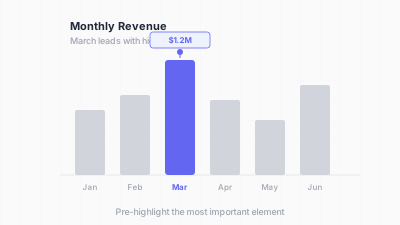
기본 화면이 가장 중요한 질문에 답해야 한다 / The default view should answer the most important question
핵심 아이디어 / Key Ideas
- 의미 있는 정렬: 바 차트, 테이블, 순위 목록의 기본 정렬 순서는 가장 유용한 순서를 반영해야 합니다. 비교에는 값 내림차순, 시계열에는 시간순. 알파벳순은 검색에는 유용하지만 인사이트에는 거의 유용하지 않습니다.
- Sort meaningfully: the default sort order of a bar chart, table, or ranked list should reflect the most useful ordering. For comparisons, sort by value descending. For time series, sort chronologically. Alphabetical order is rarely the most useful default — it serves lookup, not insight.
- 가장 유용한 필터를 미리 선택: 대시보드에 날짜 범위 선택기가 있으면, 가장 일반적으로 필요한 기간을 기본값으로 합니다. 지역 필터가 있으면 사용자의 지역이나 "전체 지역"을 기본값으로 — 빈값이 아니라.
- Pre-select the most useful filter: if a dashboard has a date range selector, default it to the most commonly needed period. If it has a region filter, default to the user's region or "all regions" — not blank.
- 핵심 인사이트 강조: 기본 뷰가 주요 시사점을 시각적으로 분명하게 해야 합니다. 헤드라인이 "3분기 매출이 목표를 12% 초과"라면, 기본 차트에서 해당 바가 강조되고, 해당 선에 주석이 달리고, 해당 숫자가 볼드여야 합니다.
- Highlight the key insight: the default view should make the primary takeaway visually obvious. If the headline is "Q3 revenue exceeded target by 12%," the default chart should show that bar highlighted, that line annotated, that number bold.
- 스마트 빈 상태: 필터 조합이 결과를 만들지 않을 때, 기본값이 우아하게 복구해야 합니다 — 필터를 넓히라고 제안하거나, 다음으로 관련성 높은 데이터를 보여주거나, 선택이 왜 비어 있는지 설명합니다.
- Smart zero states: when a filter combination produces no results, the default should gracefully recover — suggest broadening the filter, show the next most relevant data, or explain why the selection is empty.
- 맥락에 적응하는 기본값: VP를 위한 대시보드는 회사 전체 뷰를 기본값으로, 지역 관리자를 위한 같은 대시보드는 해당 지역을 기본값으로. 시각화 플랫폼이 사용자 맥락(역할, 위치, 이력)을 사용하여 지능적 기본값을 설정해야 합니다.
- Defaults that adapt to context: a dashboard for a VP defaults to the company-wide view; the same dashboard for a regional manager defaults to their region. The visualization platform should use user context (role, location, history) to set intelligent defaults.
- 기본 해석으로서의 제목: 차트 제목은 기본 뷰가 드러내는 인사이트를 명시해야 합니다: "매출이 2025년 3분기에 정점"이 "분기별 매출"보다 좋은 기본 제목입니다. 제목이 관객에게 데이터에서 무엇을 봐야 하는지 알려줍니다.
- Title as default interpretation: the chart title should state the insight the default view reveals: "Revenue peaked in Q3 2025" is a better default title than "Revenue by Quarter." The title tells the viewer what to see in the data.
좋은 예시 / Good Examples
- The Economist의 순위 바 차트: 관심 지표 내림차순으로 정렬된 국가 또는 기업. 관객이 즉시 리더와 최하위를 봅니다. 정렬 순서가 메뉴에 묻힌 옵션이 아니라 기본값입니다.
- The Economist's ranked bar charts: countries or companies sorted by the metric of interest, descending. The viewer immediately sees the leader and the laggard. The sort order is the default, not an option buried in a menu.
- Google Analytics 기본 날짜 범위: 사용자가 리포트를 열면 날짜 범위가 "최근 28일"로 기본 설정 — 최신성과 통계적 안정성을 균형 잡는 합리적 선택. 사용자가 바꿀 수 있지만, 기본값이 가장 일반적인 질문에 답합니다: "최근에 무슨 일이 있었나?"
- Google Analytics default date range: when a user opens a report, the date range defaults to "Last 28 days" — a sensible choice that balances recency with statistical stability. The user can change it, but the default answers the most common question: "What happened recently?"
- 오늘 날짜가 미리 선택된 금융 대시보드: 오늘의 포지션, 수익, 손실을 보여주며 로드되는 포트폴리오 트래커. 사용자가 가장 관련성 높은 정보를 보기 위해 날짜를 선택할 필요가 없습니다.
- Financial dashboards with today's date pre-selected: a portfolio tracker that loads showing today's positions, gains, and losses. The user does not have to select a date to see the most relevant information.
- 의견이 담긴 초기 파라미터의 Observable 노트북: Mike Bostock의 예시는 종종 일반적 기본값 대신 흥미로운 특정 파라미터 선택으로 시작합니다. 글로벌 기온 시각화가 1900년이 아니라 현재 연도에서 시작합니다 — 흥미로운 스토리는 "지금 얼마나 변했나"이지 "오래전에 어땠나"가 아닙니다.
- Observable notebooks with opinionated initial parameters: Mike Bostock's examples often start with a specific, interesting parameter choice rather than a generic default. A visualization of global temperature starts at the current year, not 1900 — the interesting story is "how much has it changed now," not "what was it long ago."
- "회색 + 강조" 기본값: 가장 중요한 지표나 시리즈가 색상으로 강조되고 나머지는 회색으로 로드되는 대시보드. 기본값이 관객에게 "여기서 시작하세요"를 알려줍니다.
- The "gray + highlight" default: a dashboard that loads with the most important metric or series highlighted in color and all others in grey. The default tells the viewer "start here."
안티 패턴 / Anti-Patterns
- 알파벳순 기본 정렬: 50개 국가가 A~Z로 정렬된 바 차트. 관객은 최고값과 최저값을 찾기 위해 전체 차트를 스캔해야 합니다. 정렬 순서가 분석적 목적을 충족하지 않습니다.
- Alphabetical sort by default: a bar chart of 50 countries sorted A–Z. The viewer must scan the entire chart to find the highest and lowest values. The sort order serves no analytical purpose.
- 기본값이 "전체"인 모든 것: 모든 지역, 모든 제품, 모든 기간이 기본값인 대시보드. 결과는 특정 질문에 답하지 않는 복잡한 개요이거나, 너무 많은 데이터의 무게에 차트가 무너지는 것입니다.
- "All" as the default everything: a dashboard that defaults to all regions, all products, all time periods. The result is either a cluttered overview that answers no specific question, or a chart that crashes under the weight of too much data.
- 빈 기본 상태: 모든 필터가 선택되지 않은 채 로드되어 사용자가 차트가 나타나기 전에 지역, 제품, 날짜 범위를 선택해야 하는 대시보드. 관객은 정보를 받기 전에 세 가지 결정을 해야 합니다.
- Blank default states: a dashboard that loads with all filters unselected, requiring the user to choose a region, product, and date range before any chart appears. The viewer must make three decisions before receiving any information.
- 기본 강조 없음: 8개 시리즈가 모두 똑같이 선명한 색으로 렌더링되고, 주석이나 강조가 없는 라인 차트. 관객의 시선이 시작할 곳이 없습니다. 하나의 시리즈가 시각적으로 두드러져야 합니다.
- No default emphasis: a line chart with 8 series, all rendered in equally vibrant colors, with no annotation or highlight. The viewer's eye has nowhere to start. One series should be visually prominent.
- 오래된 기본값: 2026년 3월인데 아무도 기본 날짜 파라미터를 업데이트하지 않아 여전히 "2024"가 기본값인 대시보드. 모든 사용자가 가장 먼저 하는 것이 날짜 변경이며, 시간 낭비와 신뢰 저하를 초래합니다.
- Stale defaults: a dashboard that still defaults to "2024" in March 2026 because nobody updated the default date parameter. The first thing every user does is change the date, wasting time and eroding trust.
- "차트 먼저, 질문은 없다": 관객이 어떤 질문에 답이 필요한지 묻지 않고 데이터를 표시하는 차트를 만드는 것. 기본 뷰는 일반적 데이터 표시가 아니라 특정 질문에 대한 답이어야 합니다.
- "Chart first, question never": building a chart that displays data without ever asking what question the viewer needs answered. The default view should be the answer to a specific question, not a generic data display.
더 읽어보기 / Further Reading
- Wathan, A., & Schoger, S. (2018). Refactoring UI. Self-published.
- Few, S. (2006). Information Dashboard Design. Analytics Press.
- Shneiderman, B. (1996). The Eyes Have It: A Task by Data Type Taxonomy for Information Visualizations. Proceedings of the IEEE Symposium on Visual Languages, 336–343.
- Knaflic, C. N. (2015). Storytelling with Data. Wiley.
- Bostock, M. (2023). Observable Plot documentation — https://observablehq.com/plot/