설명 / Description
차트가 "비어 보이거나" "미완성"으로 느껴질 때, 본능은 장식하는 것입니다 — 그라데이션 배경 추가, 바에 드롭 섀도우, 3D 렌더링, 코너에 스톡 사진, 두꺼운 테두리와 색상 패널로 시각화를 둘러싸기. 이러한 장식은 정보를 추가하지 않으면서 시각적 대역폭을 소모합니다. 차트가 더 "디자인된" 느낌은 주지만 더 유용하지는 않습니다. 대안은 장식을 맥락으로 대체하는 것입니다: 바 차트 뒤의 그라데이션 대신 작년 값을 보여주는 참조선을 추가하고, 장식적 테두리 대신 핵심 인사이트를 명시하는 부제를 추가하고, 3D 렌더링 대신 불확실성을 보여주는 에러 바를 추가합니다. 장식이 소모했을 시각적 "무게"가 의미 쪽으로 방향 전환됩니다.
Edward Tufte는 이를 데이터-잉크 비율 극대화 원칙으로 정립했습니다 — 페이지의 모든 잉크 방울이 데이터를 전달해야 합니다. Adam Wathan과 Steve Schoger는 이를 인터페이스 디자인 전반으로 확장합니다: "디자인이 너무 단순하게 느껴지면, 시각적 장식을 추가하지 말라. 유용한 콘텐츠를 추가하라." 빈 프로필 페이지에 장식적 배경 패턴이 필요한 것이 아니라, 최근 활동 피드, 통계 요약, 자기소개 프롬프트가 필요합니다. 빈 차트에 크롬이 필요한 것이 아니라 맥락이 필요합니다. 맥락이란 관객의 해석을 돕는, 데이터를 둘러싼 정보입니다: 목표는 무엇이었나? 이 기간이 지난 기간과 어떻게 비교되나? 업계 벤치마크는? 트렌드가 통계적으로 유의한가, 단순한 잡음인가? 데이터 출처는 어디이며, 마지막 업데이트는 언제인가?
이 원칙은 시각적 디자인을 거부하지 않습니다 — 방향을 전환합니다. 잘 선택된 부제가 있는 아름답게 조판된 제목은 그라데이션 배경보다 시각적으로 더 매력적이면서 더 유용합니다. 가늘고 우아한 참조선은 드롭 섀도우보다 시각적으로 더 흥미로우면서 비교 앵커를 제공합니다. 가장 기억에 남는 데이터 시각화 — 뉴욕 타임스, 이코노미스트, 파이낸셜 타임스의 작업 — 는 장식 때문이 아니라 깨끗한 시각적 프레임에 짜여진 맥락 정보의 밀도 때문에 인상적입니다. 디자인이 풍부하게 느껴지는 것은 크롬이 아니라 의미가 풍부하기 때문입니다.
When a chart feels "empty" or "unfinished," the instinct is to decorate — add a gradient background, apply a drop shadow to the bars, render the chart in 3D, place a stock photo in the corner, or surround the visualization with a thick border and a colored panel. These decorations consume visual bandwidth without adding information. They make the chart feel more "designed" but not more useful. The alternative is to replace decoration with context: instead of a gradient fill behind a bar chart, add a reference line showing last year's value. Instead of a decorative border, add a subtitle that states the key insight. Instead of 3D rendering, add error bars that show uncertainty. The visual "weight" that decoration would have consumed is redirected toward meaning.
Edward Tufte articulated this as the principle of maximizing the data-ink ratio — every drop of ink on the page should communicate data. Adam Wathan and Steve Schoger extend this to interface design more broadly: "If a design feels too plain, don't add visual fluff. Add useful content." A sparse profile page does not need a decorative background pattern — it needs a recent activity feed, a stats summary, or a bio prompt. A sparse chart does not need chrome — it needs context. Context is the information surrounding the data that helps the viewer interpret it: What was the target? How does this period compare to the last? What is the industry benchmark? Is the trend statistically significant or just noise? Where did the data come from, and when was it last updated?
This principle does not reject visual design — it redirects it. A beautifully typeset title with a well-chosen subtitle is more visually appealing than a gradient background, and it is also more useful. A thin, elegant reference line is more visually interesting than a drop shadow, and it provides a comparison anchor. The most memorable data visualizations — from The New York Times, The Economist, and the Financial Times — are striking not because of decoration but because of the density of contextual information woven into a clean visual frame. The design feels rich because it is rich with meaning, not with chrome.
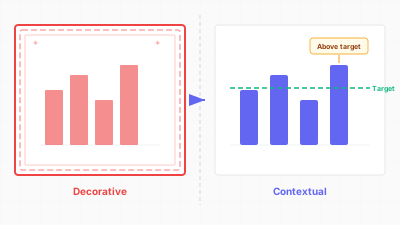
장식 대신 참조선, 벤치마크, 주석으로 의미를 채운다 / Fill with meaning — reference lines, benchmarks, and annotations instead of decoration
핵심 아이디어 / Key Ideas
- 테두리 대신 참조선: 장식적 프레임으로 차트를 둘러싸는 대신, 의미 있는 임계값 — 목표, 평균, 규제 한계, 작년 값 — 에 수평 참조선을 추가합니다. 관객에게 해석을 위한 앵커를 제공합니다.
- Reference lines over borders: instead of boxing a chart in a decorative frame, add horizontal reference lines at meaningful thresholds — the target, the average, the regulatory limit, last year's value. These give the viewer an anchor for interpretation.
- 배경 대신 비교 데이터: 차트 뒤의 색상 배경 패널 대신, 이전 기간, 동종 그룹, 또는 예측을 보여주는 두 번째 데이터 시리즈를 추가합니다. 배경이 소모했을 시각적 공간이 이제 비교 정보를 담습니다.
- Comparison data over backgrounds: instead of a colored background panel behind a chart, add a second data series showing the prior period, the peer group, or the forecast. The visual space that the background would have consumed now carries comparative information.
- 클립아트 대신 주석: 장식적 아이콘이나 일러스트레이션 대신, 핵심 변곡점에 변화의 원인을 설명하는 텍스트 주석을 추가합니다. 주석은 질문에 답하기 때문에 어떤 아이콘보다 시각적으로 더 흥미롭습니다.
- Annotations over clip art: instead of a decorative icon or illustration, add a text annotation at the key inflection point explaining what caused the change. The annotation is more visually interesting than any icon because it answers a question.
- 3D 효과 대신 불확실성 시각화: 3D 렌더링이 추가하는 시각적 복잡성(음영, 원근, 깊이 단서)은 신뢰구간, 에러 바, 확률 분포를 보여줄 수 있는 시각적 대역폭을 정확히 소모합니다. 가짜 깊이를 진짜 불확실성으로 대체하세요.
- Uncertainty visualization over 3D effects: the visual complexity that 3D rendering adds (shading, perspective, depth cues) consumes exactly the visual bandwidth that could instead show confidence intervals, error bars, or probability distributions. Replace fake depth with real uncertainty.
- 로고 대신 출처와 방법론 노트: 차트 코너에 회사 로고 워터마크가 소모하는 공간은 데이터 출처, 최종 업데이트 일자, 주의사항을 담을 수 있습니다. 이것이 브랜딩보다 신뢰를 더 효과적으로 구축합니다.
- Source and methodology notes over logos: the space often consumed by a company logo watermark in the chart corner could instead contain the data source, the date of last update, and any caveats. This builds trust more effectively than branding.
- 장식 대신 인사이트 부제: 설명적 부제("매출이 전년 대비 12% 성장, 2023년 2분기 이후 가장 빠른 속도")가 장식적 구분선으로는 결코 전달할 수 없는 맥락을 제공합니다.
- Subtitle as insight over decoration: a descriptive subtitle ("Revenue grew 12% year-over-year, the fastest rate since Q2 2023") provides context that a decorative divider line never could.
좋은 예시 / Good Examples
- Financial Times 차트 스타일: 장식적 요소 없음. 대신, 서술적 제목, 설명적 부제, 출처 표기, 가벼운 참조선. 모든 시각적 요소가 정보를 전달합니다. 아무것도 낭비되지 않기 때문에 차트가 권위 있게 느껴집니다.
- The Financial Times chart style: no decorative elements. Instead, a descriptive title, an explanatory subtitle, source attribution, and light reference lines. Every visual element carries information. The charts feel authoritative precisely because nothing is wasted.
- Stephen Few의 불릿 차트: 불릿 차트는 대시보드 게이지와 미터 — 단일 숫자를 보여주기 위해 많은 공간을 소모하는 장식적 시각화 — 의 대안으로 설계되었습니다. 불릿 차트는 현재 값, 목표, 정성적 성과 범위를 컴팩트하고 장식 없는 바에 담습니다.
- Stephen Few's bullet charts: the bullet chart was designed as a replacement for dashboard gauges and meters — decorative visualizations that consume large amounts of space to show a single number. The bullet chart packs the current value, the target, and qualitative performance ranges into a compact, decoration-free bar.
- The Economist의 주석 라인 차트: 핵심 이벤트가 얇은 수직선과 간단한 레이블로 표시됩니다. 장식적 요소는 없지만, 주석이 장식이 보통 흉내 내는 "밀도"를 제공하기 때문에 차트가 시각적으로 완결되게 느껴집니다.
- The Economist's annotated line charts: key events are marked with thin vertical lines and brief labels. No decorative elements are present, yet the charts feel visually complete because the annotations provide the "density" that decoration usually simulates.
- 변화를 보여주는 덤벨 차트: 장식적 구분선이 있는 두 개의 별도 바 차트 대신, 덤벨 차트가 선으로 연결된 시작점과 끝점을 보여줍니다. 두 값을 연결하는 시각적 요소가 장식을 가장 중요한 맥락 정보 — 변화의 크기와 방향 — 로 대체합니다.
- Dumbbell charts showing change: instead of two separate bar charts with a decorative divider, a dumbbell chart shows start and end points connected by a line. The visual element that connects the two values replaces decoration with the most important contextual information: the magnitude and direction of change.
- 맥락 마커가 있는 스파크라인: 현재 값을 표시하는 점과 이전 기간 값을 표시하는 얇은 선이 있는 스파크라인. 두 개의 작은 맥락 마크가 단순한 트렌드 라인을 비교 도구로 변환하며, 장식적 장치보다 더 많은 시각적 공간을 사용하지 않습니다.
- Sparklines with contextual markers: a sparkline with a dot marking the current value and a thin line marking the prior period's value. Two tiny contextual marks transform a simple trend line into a comparative tool, using no more visual space than a decorative flourish would.
안티 패턴 / Anti-Patterns
- 그라데이션 배경: 정보를 추가하지 않고, 색상 쪽 끝에서 데이터 마크의 대비를 줄이며, 모든 조건에서 차트를 읽기 어렵게 만드는 파랑-흰 그라데이션 위에 렌더링된 차트.
- Gradient backgrounds: a chart rendered over a blue-to-white gradient that adds no information, reduces contrast for data marks near the colored end, and makes the chart harder to read in all conditions.
- 3D 바 차트: 2차원 데이터의 3차원 렌더링. 원근 왜곡으로 바 높이 비교가 어렵고, 음영이 시각적 대역폭을 소모하며, 깊이 축은 아무것도 인코딩하지 않습니다. 3D 효과에 할애된 모든 픽셀은 잠재적 맥락에서 빼앗긴 픽셀입니다.
- 3D bar charts: three-dimensional rendering of two-dimensional data. The perspective distortion makes bar heights difficult to compare, the shading consumes visual bandwidth, and the depth axis encodes nothing. Every pixel devoted to the 3D effect is a pixel stolen from potential context.
- 장식적 테두리와 그림자: 차트 패널 주위의 두꺼운 테두리와 드롭 섀도우. 공간을 소모하고, 시각적 잡음을 추가하며, 아무것도 전달하지 않습니다. 여백이나 얇은 1px 구분선으로 미묘한 분리를 하세요.
- Decorative borders and shadows: thick borders and drop shadows around chart panels. These consume space, add visual noise, and communicate nothing. Replace them with subtle separation through whitespace or thin 1px dividers.
- 스톡 사진과 클립아트: 주제를 "설명"하기 위해 차트 근처에 배치된 이미지(제조 데이터 옆의 공장 사진, 금융 데이터 옆의 저금통). 벤치마크 비교, 트렌드 주석, 방법론 노트를 담을 수 있는 공간을 소모합니다.
- Stock photos and clip art: images placed near charts to "illustrate" the topic (a photo of a factory next to manufacturing data, a piggy bank next to financial data). These consume space that could hold a benchmark comparison, a trend annotation, or a methodology note.
- 데이터 영역 위의 로고 워터마크: 차트 데이터 영역에 30% 불투명도로 렌더링된 회사 로고. 데이터 마크를 가리고, 가독성을 저하시키며, 분석적 가치를 제공하지 않습니다.
- Logo watermarks over the data area: a company logo rendered at 30% opacity across the chart's data area. It obscures data marks, degrades legibility, and provides no analytical value.
- 장식적 격자선: 시각적으로 차트를 지배하는 무겁고, 어둡고, 촘촘한 격자선. 격자선이 가장 눈에 띄는 요소라면 맥락이 아니라 장식입니다. 뒤로 물러날 때까지 밝게 하거나, 제거하고 직접 레이블에 의존하세요.
- Ornamental gridlines: heavy, dark, closely spaced gridlines that visually dominate the chart. If the gridlines are the most visible element, they are decoration, not context. Lighten them until they recede, or remove them and rely on direct labels.
더 읽어보기 / Further Reading
- Wathan, A., & Schoger, S. (2018). Refactoring UI. Self-published.
- Tufte, E. R. (1983). The Visual Display of Quantitative Information. Graphics Press.
- Schwabish, J. (2021). Better Data Visualizations. Columbia University Press.
- Few, S. (2006). Bullet Graph Design Specification. Perceptual Edge.
- Kirk, A. (2019). Data Visualisation: A Handbook for Data Driven Design (2nd ed.). SAGE Publications.