설명 / Description
데이터 시각화에서의 접근성이란 차트에 인코딩된 정보를 시각 장애, 색각이상, 운동 장애, 인지적 차이를 가진 사람들을 포함한 가장 넓은 범위의 대중이 인식하고, 탐색하고, 이해할 수 있도록 보장하는 것입니다. 이는 틈새 관심사가 아닙니다: 남성의 약 8%, 여성의 0.5%가 어떤 형태의 색각이상을 가지고 있고, 전 세계 22억 명이 시력 장애를 가지며, 고령화 인구는 대비 감도가 저하된 시청자의 수가 매년 증가하고 있음을 의미합니다.
접근 가능한 시각화 디자인은 WCAG 프레임워크에 따라 네 가지 수준에서 작동합니다: 인식 가능(시청자가 시각적 인코딩을 감지할 수 있는가?), 조작 가능(키보드와 스크린 리더를 포함한 입력 장치로 시각화와 상호작용할 수 있는가?), 이해 가능(독해 수준, 언어, 인지 능력을 고려할 때 차트를 해석할 수 있는가?), 견고함(보조 기술과 장치 전반에서 시각화가 작동하는가?). 프랭크 엘라브스키(Frank Elavsky)의 Chartability 프레임워크는 WCAG를 데이터 시각화에 특화하여 확장하며, 각 범주에 대한 테스트 가능한 휴리스틱을 제공합니다.
가장 영향력 있는 접근성 개선은 가장 간단하기도 합니다: 텍스트 대안(대체 텍스트, 데이터 테이블) 제공, 색각이상 안전 팔레트와 중복 인코딩 사용, 충분한 대비율 확보, 키보드 내비게이션 지원, 명확한 제목과 주석 작성. 이러한 관행은 장애가 있는 사용자뿐 아니라 모든 사용자에게 도움이 됩니다 — 이를 "커브 컷 효과(curb cut effect)"라고 하며, 접근성을 위해 설계된 편의 시설이 모든 사람의 경험을 개선하는 현상입니다.
Accessibility in data visualization means ensuring that the information encoded in a chart can be perceived, navigated, and understood by the widest possible audience, including people with visual impairments, color vision deficiency, motor disabilities, and cognitive differences. This is not a niche concern: approximately 8% of men and 0.5% of women have some form of color vision deficiency, 2.2 billion people globally have vision impairment, and an aging population means the number of viewers with reduced contrast sensitivity is growing every year.
Accessible visualization design operates on four levels, following the WCAG framework: perceivable (can the viewer detect the visual encodings?), operable (can the viewer interact with the visualization using their input device, including keyboard and screen reader?), understandable (can the viewer interpret the chart given their reading level, language, and cognitive abilities?), and robust (does the visualization work across assistive technologies and devices?). Frank Elavsky's Chartability framework extends WCAG specifically for data visualization, providing testable heuristics for each of these categories.
The most impactful accessibility improvements are also the simplest: providing text alternatives (alt text, data tables), using colorblind-safe palettes with redundant encoding, ensuring sufficient contrast ratios, supporting keyboard navigation, and writing clear titles and annotations. These practices benefit all users, not just those with disabilities — a phenomenon known as the "curb cut effect," where accommodations designed for accessibility improve the experience for everyone.
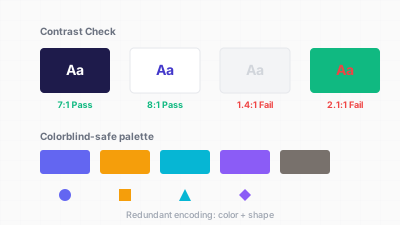
접근성 높은 시각화: 색상+형태 중복 인코딩, 충분한 대비, 대체 텍스트 / Accessible visualization: color+shape redundant encoding, sufficient contrast, alt text
핵심 아이디어 / Key Ideas
- 색상이 유일한 채널이 되어서는 안 됩니다: 항상 색상에 두 번째 인코딩(형태, 패턴, 텍스처, 레이블, 위치)을 쌍으로 사용하여 색각이상 시청자와 흑백 인쇄에서도 정보가 접근 가능하게 합니다.
- Color is never the only channel: always pair color with a second encoding (shape, pattern, texture, label, position) so that information is accessible to colorblind viewers and in grayscale printouts.
- 대비율: 텍스트는 WCAG AA 대비율(일반 텍스트 4.5:1, 큰 텍스트 3:1)을 충족해야 합니다. 데이터 마크는 배경 대비 최소 3:1이 되어야 합니다.
- Contrast ratios: text must meet WCAG AA contrast ratios (4.5:1 for normal text, 3:1 for large text). Data marks should have sufficient contrast against the background (at least 3:1).
- 차트의 대체 텍스트: 웹에 게시되는 모든 차트에 차트 유형, 데이터 표현 내용, 핵심 요점을 전달하는 설명적 대체 텍스트가 있어야 합니다. 예: "2000~2024년 미국 실업률을 보여주는 꺾은선 그래프, 2020년 4월 14.7%로 정점."
- Alt text for charts: every chart published on the web should have descriptive alt text that conveys the chart type, what the data represents, and the key takeaway. Example: "Line chart showing US unemployment rate from 2000 to 2024, peaking at 14.7% in April 2020."
- 대안으로서의 데이터 테이블: 모든 차트 옆이나 뒤에 구조화된 데이터 테이블을 제공하여 스크린 리더 사용자와 시각적 해독이 불가능한 시청자가 기본 데이터에 접근할 수 있게 합니다.
- Data tables as fallback: provide a structured data table alongside or behind every chart so screen reader users and viewers who cannot decode the visual can access the underlying data.
- 키보드 내비게이션: 인터랙티브 시각화는 Tab, Enter, 화살표 키로 탐색 가능해야 합니다. 포커스 표시기가 보여야 합니다.
- Keyboard navigation: interactive visualizations must be navigable with Tab, Enter, and arrow keys. Focus indicators must be visible.
- 텍스트 크기: 주석과 축 레이블 최소 12px; 웹 본문 텍스트 16px. 텍스트 크기 조정 옵션 제공을 고려합니다.
- Text size: minimum 12px for annotations and axis labels; 16px for body text on web. Consider offering a text-resize option.
- 발작 유발 요소 회피: 깜박임, 빠른 애니메이션, 초당 3회 이상의 자동 재생 전환을 사용하지 않습니다.
- Avoid seizure triggers: do not use flashing, rapid animation, or auto-playing transitions faster than 3 per second.
좋은 예시 / Good Examples
- 워싱턴 포스트는 모든 차트 이미지에 구조화된 대체 텍스트를 삽입하여 스크린 리더 사용자에게 차트 유형과 핵심 데이터 통찰을 설명합니다.
- The Washington Post embeds structured alt text in all chart images, describing both the chart type and the key data insight for screen reader users.
- ARIA 역할과 레이블이 있는 Observable 및 D3 시각화: 차트 요소에
role="img",aria-label,aria-describedby속성이 태그되어 보조 기술로 탐색 가능합니다. - Observable and D3 visualizations with ARIA roles and labels: chart elements are tagged with
role="img",aria-label, andaria-describedbyattributes, making them navigable by assistive technology. - 색상에 더해 패턴 채우기가 있는 히트맵: 흑백 인쇄나 색각이상 시청자가 볼 때 패턴(대각선, 점, 격자)이 구분 가능하게 남습니다.
- Heatmaps with pattern fills in addition to color: when printed in grayscale or viewed by a colorblind user, the patterns (diagonal lines, dots, crosshatch) remain distinguishable.
- 키보드 지원 인터랙티브 차트: Highcharts 등의 라이브러리가 데이터 포인트 간 키보드 내비게이션을 제공하여 스크린 리더로 값을 음성 출력합니다.
- Interactive charts with keyboard support: Highcharts and other libraries provide keyboard navigation through data points, reading values aloud via screen readers.
- 색각이상 안전 팔레트: deuteranopia, protanopia, tritanopia에 대해 테스트된 viridis, cividis, 또는 큐레이션된 ColorBrewer 팔레트 사용.
- Colorblind-safe palettes: using viridis, cividis, or curated ColorBrewer palettes that are tested for deuteranopia, protanopia, and tritanopia.
안티 패턴 / Anti-Patterns
- 중복 없는 빨강-초록 인코딩: 텍스트나 아이콘 레이블 없이 빨강, 노랑, 초록의 신호등 표시기. 남성 시청자의 약 8%가 빨강과 초록을 구별할 수 없습니다.
- Red-green encoding without redundancy: a traffic-light indicator using red, yellow, and green with no text or icon labels. Approximately 8% of male viewers cannot distinguish red from green.
- 흰 배경에 연한 회색 텍스트: "미니멀리스트" 디자인에서 인기 있지만 대비 요구 사항에 미달합니다. 연한 회색 축 레이블은 저시력 시청자에게 보이지 않을 수 있습니다.
- Light gray text on white backgrounds: popular in "minimalist" design but fails contrast requirements. Light gray axis labels may be invisible to viewers with low vision.
- 대체 텍스트 없이 단순 이미지로 게시된 차트: 스크린 리더가
<img src="chart.png">를 만나면 "이미지"라고만 읽습니다 — 데이터가 완전히 접근 불가능합니다. - Charts published as flat images with no alt text: a screen reader encounters
<img src="chart.png">and announces "image" — the data is completely inaccessible. - 마우스 전용 인터랙션: 호버에서만 나타나는 툴팁으로 키보드 등가물이 없습니다. 키보드, 스크린 리더, 터치 장치 사용자가 정보에 접근할 수 없습니다.
- Mouse-only interactions: tooltips that appear only on hover, with no keyboard equivalent. Viewers using keyboards, screen readers, or touch devices cannot access the information.
- 자동 재생 애니메이션: 페이지 로드 시 일시 정지/중지 컨트롤 없이 애니메이션되는 차트. 전정 기관 장애가 있는 일부 시청자는 예상치 못한 움직임에서 메스꺼움을 경험합니다.
- Autoplay animations: charts that animate on page load with no pause/stop control. Some viewers with vestibular disorders experience nausea from unexpected motion.
- 복잡한 차트의 작은 텍스트: 표준 모니터에서 20/20 시력을 가진 시청자에게도 읽을 수 없는 8px 레이블이 있는 밀집된 시각화.
- Tiny text in complex charts: dense visualizations with 8px labels that are illegible even for viewers with 20/20 vision on a standard monitor.
더 읽어보기 / Further Reading
- Elavsky, F., et al. (2022). How accessible is my visualization? Evaluating visualization accessibility with Chartability. Computer Graphics Forum, 41(3).
- W3C. (2018). Web Content Accessibility Guidelines (WCAG) 2.1. https://www.w3.org/TR/WCAG21/
- Cesal, A. (2020). Writing Alt Text for Data Visualization. Nightingale (Journal of the Data Visualization Society).
- Marriott, K., et al. (2021). Accessible Visualization on the Web. IEEE VIS Tutorial.
- Chartability: https://chartability.fizz.studio/